▪ |
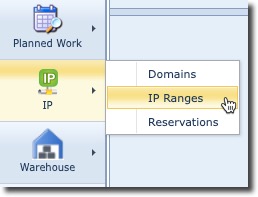
From the IMS Main Menu bar click on the IP icon and the select IP Ranges from the dropdown list |
This opens up a blank IP Range form from which you can create a new one or search for an existing one.
|
<< Click to Display Table of Contents >> Navigation: IMS version 23.1 > IMS Basics - User Guide 23. > IP Management > IP Ranges > Accessing IP Ranges |
▪ |
From the IMS Main Menu bar click on the IP icon and the select IP Ranges from the dropdown list |
This opens up a blank IP Range form from which you can create a new one or search for an existing one.