|
When an IP Range is first created, all IP Addresses in that range are listed in the IP Address tab below the details pane.
Once the first Sub Range is created from that initial IP Range, the individual IP Address tab is replaced with a Sub Range tab.
In order to then see the individual IP Addresses contained in the Sub Range/s you must click on the required Sub Range which will open a fresh IP Range pane displaying the required Sub Range details tab as well as a list of all IP Addresses in its own tab. |

▪ |
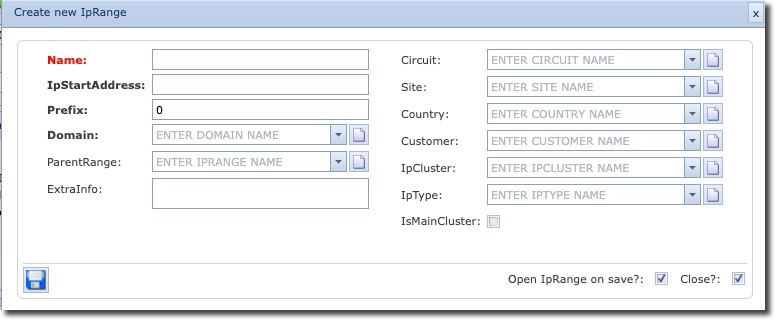
From the IpRangeForm Actions button bar click on the Create new icon, this opens up a Create new IpRange popup window |
▪ |
Fill in the required fields of information, details of which are given below. |
Name |
The name of this IP Range – may or may not include the IP Range address. Can contain alphanumeric characters. |
IPStartAddress |
The start address of the IP Range, must be a valid IP number i.e., 10.0.0.0. This can be in IPv4 or IPv6. |
Prefix |
The mask number (CIDR) |
Domain |
The IMS domain, not to be confused with the more general IP Domain. An example of an IMS domain could be the name of the company this IP Range will reference |
ParentRange |
This will be autopopulated if this IP Range is a Sub Range. |
ExtraInfo |
User defined field of extra information as required |
Circuit, Site, Country, Customer |
Various IMS objects this IP Range can be assigned to |
IpCluster |
User defined field for segregating IP ranges according to a business or use case – The Cluster concept in IT allows for intra-cluster communication between devices or pods. No communication from the outside is allowed. |
IpType |
User defined field for defining an IP Cluster into types according to a business or use case – this field is non functional. |
IsMainCluster |
User defined tick box to denote if an IP Cluster is to be the head or main cluster in an IP Cluster scenario. |
For the benefit of an example, the following screenshot depicts an IP Range starting from an A class IP number of 10.0.0.0 with a mask of 24 – a total of 256 IP numbers given.
