The DELETE command is used to delete/remove an object from the IMS database.

Click the 'TRY IT OUT' button

The syntax is:
{
"id": "string",
"propertyAndValues": [
{
"property": "string",
"value": "string"
}
]
}
Fill in:
Entity = City
ID = name:GRONINGEN
{"id": "name:GRONINGEN",
"propertyandvalues": []
}
The call that is generated:
curl -X DELETE "http://your url/api/Ims/City" -H "accept: application/json" -H "Authorization: b7712a28-8398-4367-833d-e591a66082c9"
-H "Content-Type: application/json-patch+json" -d "{\"id\": \"name:GRONINGEN\",\"propertyandvalues\": []}"
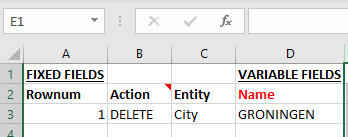
The same functionality via the bulk loader looks like this:
FIXED FIELDS |
VARIABLE FIELDS |
||
Rownum |
Action |
Entity |
Id |
1 |
DELETE |
City |
Name:GRONINGEN |
OR
you can use the bulk loader by using the Name column