Email Setup form
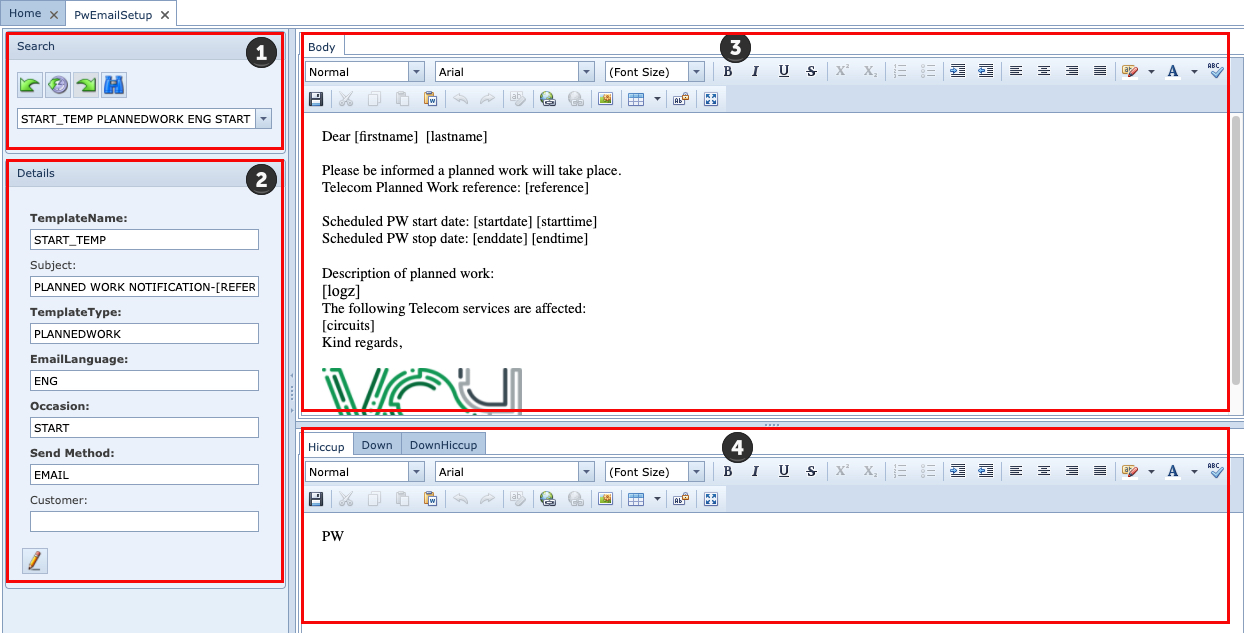
The Email Setup form contains 4 main panes of information
|
Search |
This area is for searching existing Email Setup instances. These instances contain the email framework and relevant placeholders for field data associated with a particular Planned Work instance. |
|
Details [Email Setup] |
This section provides the essential Email Setup instance details: TemplateName: The name given to this email template instance Subject: Brief description - data at run time can be referenced TemplateType: Planned Work or Trouble Ticket EmailLanguage: English, French German or Dutch Occasion: End or Start of Planned Work - when the email is to be sent SendMethod: Email or SMS Customer: Option should an Email Template be used for just one customer. If a customer is selected then contacts related to this customer will be informed of Planned Work activity. Be aware that should an Inform Customers instance be using this Email template and different customers are associated with the related Planned Work, then the email template will be removed from the Inform Customers instance and you will have to select another in its place. |
|
Body [Email content] |
This section provides the essential Email template details to be used in informing customers for this particular Planned Work instance. Placeholder items may be included here to provide associated data from the Planned Work instance. See below for Placeholder items that can be used. |
|
Additional Info Tabs [Email] |
These tabs allow for the setting up of different user defined messages in an email based upon the outcome of the Impact Analysis on all the listed Circuits listed in the Impact per group tab. IMS will use one of the following 3 messages based on the result set from an Impact Analysis:
Hiccup: If all Circuits are not down i.e., all Circuits have a backup/protection route Down: If all Circuits are showing to be Down DownHiccup: If there is a mix of Down and Hiccup
In this way a user can tailor the message in the body of an email to best describe the outcome of an upcoming Planned Work |


Note:
A Circuit is considered in a 'Down' state if its main and backup paths are faulty - Circuit is non-operational
A Circuit is considered in a 'Hiccup' state if only one of its paths is faulty - Circuit is still operational
Placeholder items
[plannedworkmain|id] - ID
[plannedworkmain|name] - name
[plannedworkmain|description] - description
[plannedworkmain|description|toupper] - description
[plannedWORKmain|description|tolower] - description
[planNEDworkmain|description|upperfirst] - description
[contact|lastname] - ContactLastName
[contact|lastname|toupper] - ContactLastName
[contact|lastname|tolower] - ContactLastName
[contact|lastname|upperfirst] - ContactLastName
[contact|Phone] - ContactPhone
[contact|moBILE] - Mobile ContactPhone
Impact Details: Tabs and Columns
Tab |
Column |
Description |
Customers |
Customer [Name] |
List of all impacted customers |
|
Count Down |
Number of Circuits that will be in a Down status |
|
CountProtectionSwitch |
Number of Circuits that are protected by Circuit backup mechanisms |
|
The following three fields are related to calculations performed on types of impact on networks that are connectionless by nature i.e., where connection's source and destinations are known but routes through the network are determined on an adhoc basis at the time of setup and subsequent reroutes. |
|
|
Count AtRisk |
At risk due to the loss of redundancy resilience for a given circuit in the network - related to the IMS Domain object found in the IP module |
|
Count Impact |
The circuit has experienced loss of service |
|
Count NoImpact |
No impact on a given circuit - related to the IMS Domain object found in the IP module |
Customer and Contact |
PlannedWorkMail |
List of email addresses to be used to inform Customers |
|
Language |
Language that should be used in the email to inform a particular contact - Languages available: English, French, German, Dutch - This setting is derived from the Language field in the IMS Contact object. |
|
Customer |
The name of the Customer - Derived from the Full Name field in the IMS Customer object |
|
PlannedWorkMailType |
|
Contact emailaddresses |
PlannedWorkMail |
List of email addresses to be used to inform customers |
|
Language |
Language that should be used in the email to inform a particular contact - Languages available: English, French, German, Dutch - This setting is derived from the Language field in the IMS Contact object. |
|
PlannedWorkMailType |
Text |
Contact informed |
Email address used to contact Customer |
|
|
Date |
The date and time the email was sent |
|
Customer |
The list of Customers contacted |
|
Type |
The stage of the Planned Work when the contacting of the Customer should be done i.e., at the Start or End |
Circuits |
Name |
The list of Circuit names |
|
Speed |
The list of Speeds for each Circuit |
|
Customer |
The list of Customers contacted - Derived from the Name and Full Name fields in the IMS Customer object |