This chapter describes the Floorplan feature in VC4’s IMS.
The Floorplan feature supports the management of the floor space of the sites. Viewing a graphical representation of the site, users can manage the floor space efficiently.
Some of the features include:
Floor plan details: |
Floor tiles |
Tile height |
|
Tile width |
|
Flexible labelling of floor tiles |
|
Racks/Cabinets |
|
Nodes, Power, DDF/ODFs, Shelves |
|
Walls and entrances |
|
Rotation of objects on the floorplan |
|
Drag and drop functionality |
|
Zoom In / Out |
|
Copy to Microsoft Visio (VSG file) |
|
The Floorplan functionality is accessed from the main menu bar via the Site object.
▪ |
Click Site |
▪ |
Then from the dropdown list click Floorplan |
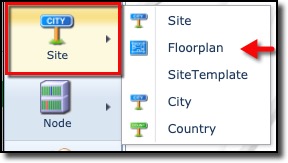
This opens the main Floorplan pane.

Three areas of information are available in the Floorplan window:
1 |
Search and Details area |
Search and Summary details of the Floorplan |
2 |
Floorplan layout area |
Graphical representation of the Floorplan and its contained equipment |
3 |
Floorplan details area |
In-depth information of the Floorplan with subsequent tab information |