The most common purpose of an interface to a NMS, EMS or NEs is Network Reconciliation and Auto
Discovery. IMS will take a snapshot of the NMS/EMS and NE data and compare this data with the data in
the IMS database.
This is normally performed once a day. This could be configured to run at any interval depending on the
type of interface.
Reconcile Process
The steps below describe the reconcile process:
1.Data collection: Each night IMS collects the data from NMS/EMS and/or NE’s, this is called the
raw data.
2.The raw data is stored in tables of a dedicated database schema.
3.Data translation: Based on mutual requirements, a selection of the raw data is translated into
normalized data, which can be reconciled, this is called the reconcile data.
4.The reconcile data is stored in in IMS Reconcile tables of a dedicated database schema.
3.Each inventory item (e.g. equipment, connection) has a unique link ID to NMS/EMS/NE,
called a NMS_ID. This means that there is a relation between the name in IMS and name in NMS,
as they could be different.
4.Connections running over multiple platforms can have multiple different NMS_ID’s so that IMS knows
exactly which part of the connections should be synchronized.
5.IMS will query/compare the data in the “reconcile” tables with the “normal” IMS database.
Two options in case of differences between NMS – IMS:
1)The IMS auto-discovery process corrects data automatically in the IMS database.
2)IMS shows the difference in the reconcile form for users to act upon.
The frequency of the reconciliation process can be set by the IMS Admin user (e.g. daily at a specific time,
weekly).
Automatic discovery
The IMS automatic discovery process can correct the data in IMS database automatically.
Examples are:
-New equipment in the network, but not yet in IMS
-New connections in the network, but not yet in IMS
-New inserted cards in the network, but not yet in IMS
-Serial numbers not (correct) in the IMS database
-Software/Hardware versions
-Etc.
Customers may decide which objects will be automatically discovered or reported as a mismatch.
Equipment discovery
The reconcile and automatic discovery process will be able to collect all the equipment information.
In most cases this means that the following information is discovered:
•Equipment name
•Equipment type
•Equipment parameters
•Equipment shelf name
•Equipment shelf type
•Equipment shelf parameters
•Card name
•Card type/codes/part number
•Card parameters
•Slot position of cards
Please note that the reconcile and automatic discovery process is not limited to this list and can be
configured to collect any data.
Limitation of network equipment data
A NMS/EMS or NE not always provides all information, this is a limitation on the network side,
not a limitation of VC4-IMS.
Still VC4-IMS will have some features to populate data specific missing information.
Example:
Some Equipment vendor NMS NBI’s have issues to provide SFP/XFP (pluggable cards) information.
Since SFP/XFP’s have ports, VC4-IMS will need those ports to be able to connect physical connections
to it.
To overcome this issue, VC4 has implemented the following methodology:
If IMS discovers a connection on a port, but this port is not present due to missing SFP/XFP information,
IMS will create a dummy SFP/XFP with a port.
Now that the port is there, IMS can continue loading the connections and topology. Once the equipment
vendor NBI issue is resolved by the equipment vendor, IMS will find the correct SFP/XFP and will replace
the dummy card with the real one without affecting the connectivity.
Port discovery
In the automatic discovery process of equipment, the ports are not directly populated from the network
data. IMS will follow the vendor equipment specifications of the cards/SFP/XFP.
If a card has 2 x 1GBE ports, VC4-IMS will automatically create these two ports when inserting this card
in a slot. It will directly have the correct port settings.
Physical connection discovery
The discovery and loading of physical connections is dependent on the availability of the network data.
Most NMS’s should give full information, as they hold the full network topology. NBI’s like CORBA, MTOSI
provide the A-end and Z-end details per physical connection.
Element Management Systems (EMS) provide less information, as they only hold the elements (equipment)
data and not the network (connection) data. To find the connectivity, if there is no NMS available, VC4-IMS
must connect to the NE’s directly.
To connect to the NE, there are several possibilities, like SNMP, TL1, Telnet or SSH. It is depending on the
type of equipment which method suits best to retrieve all information needed.
For physical connections, it is important to have the following information:
Node A, Shelf A, Slot/Card A, Port A to which Node B, Shelf B, Slot/Card B, Port B.
Connection names are less important, because VC4-IMS can create those names automatically if needed.
The “Port A – Port B” commands can be found via:
-“Neighbor” commands (sometimes not standard enabled), for example:
oCisco router/switch: show cdp neighbors
oCisco router/switch: show lldp neighbors
oJuniper router: show lldp neighbors
oCisco ONS: show topology neighbor detail
-Vendor proprietary CLI commands
-TL1 commands
-SNMP commands which are often very limited
Neighbor commands are not always enabled for security reasons. One-time access could be enough to
collect the information automatically. However, this is not always allowed by our Clients.
Work around in case no “Port A – Port B” commands available:
Often each port will have a so called “comment” or “description” field in the configuration of the NE.
This port comment can be used to agree a standard naming convention to register the connected neighbor
port, for example: <nodename> _<shelfname>_ <card/slot>_<port>.
Logical connection and service discovery
The discovery and loading of logical connections and services is depending on the availability of the network
data.
Most NMS’s should give full information, as they often hold the full network topology. NBI’s like CORBA,
MTOSI will provide the logical connections, services and the routing (carriers) of the connections and
services.
For example:
-How a L2VPN or L3VPN is routed over a V-LAN.
-How an ODU2 (DWDM) connection is routed over an ODU3 or ODU4.
Element Management Systems (EMS) provide standard less information, as they only hold the element
(equipment) data and not the network (connection) data. To find the connectivity, if there is no NMS
available, VC4-IMS must connect to the NE’s directly.
To connect to the NE, there are several possibilities, like SNMP, TL1, Telnet or SSH. It is dependent per
type of equipment which method suits best to retrieve all information needed.
Each vendor equipment type will have its own command set to retrieve the logical connections and services
data.
Getting the end-to-end picture
VC4-IMS network discovery will try to make a nice end-to-end picture that is useful for the telecom
network engineers.
Even connected to NE’s (when all necessary information is available), VC4-IMS will be able to present a
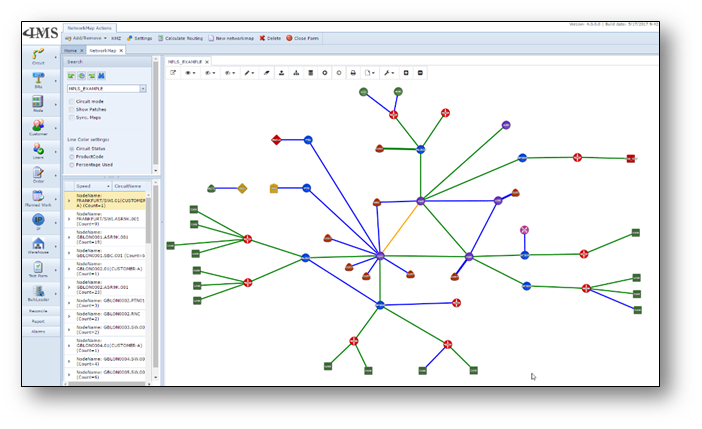
topology map. IMS users will be able to do quick fault correlation and faster service delivery.