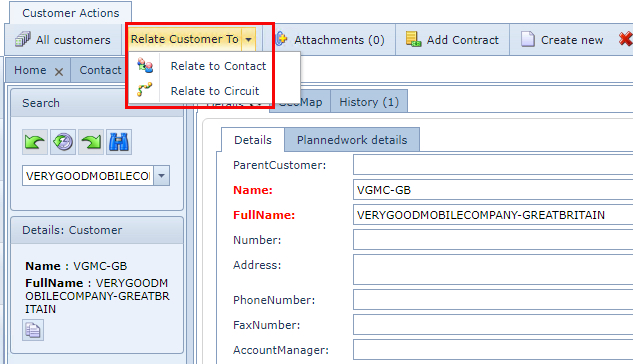
A Customer can be related to one or more of the following objects:
➢Contact
➢Circuit
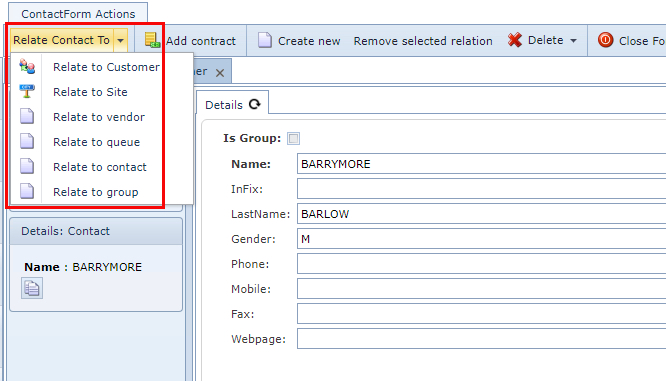
A Contact can be related to one or more of the following objects:
➢Customer
➢Site
➢Vendor
➢Queue
➢Contact
➢Group
Note: Sometimes Contacts are required for other IMS functionality i.e., informing customers automatically, which is a feature of the Planned Work and Impact Analysis module.
The process for relating either a Contact or Customer is similar.
From their respective Form Actions Button Bar:
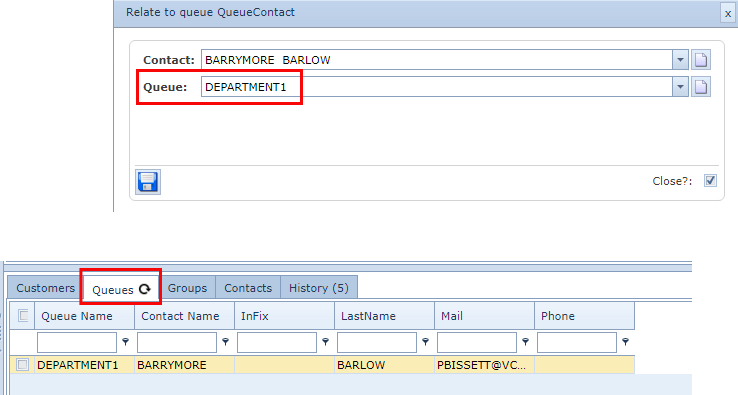
In this example a Contact is related to a Queue object
▪Select the required related object
▪Fill in the corresponding popup window with the required information (Queue: Department1)
▪Click on the Save icon at the lower left of each popup window
▪Refresh the Contacts Form - left click on the binoculars icon
A Queues Tab will appear in the lower half of the form, with the Contact/Queue details.
Note: If the Queues tab is already present, it indicates that this Contact has previously been related to a Queue/s