Accessing the User Groups Feature
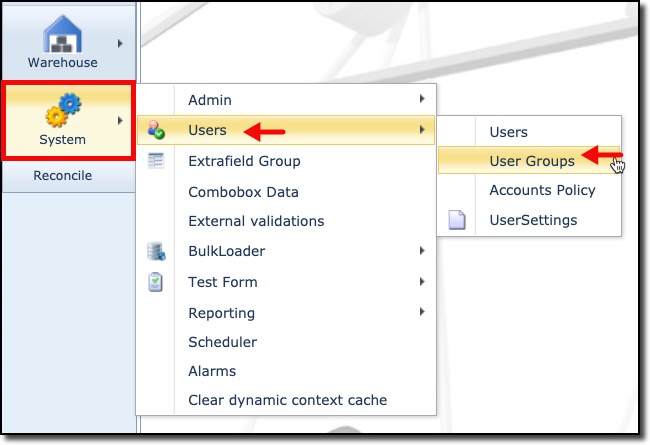
From the IMS Main menu bar:
▪ |
Click on the System icon |
▪ |
In the following dropdown list, select Users and then User groups |
The UserForm Actions tab with an empty User tab form is displayed.
There are some important concepts to understand on how User Access Control is implemented in IMS.
The following shows various components that combine to create a User Group that a User is
then added to. The areas in red are set by default in the IMS system, the blue areas are set by the IMS
administrators – typically implementation teams.
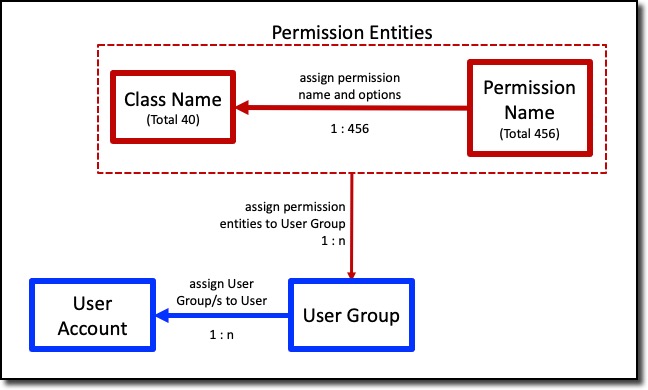
A User Groups is characterized by its role and function in the network and is typically driven by the
business case or department i.e., Network Administration, Service Provisioning, Network and
Services Design Team, Financial/Accounts Group, etc.
Once these User Groups are set up and their permission options selected (by default all
Permission Entities are unselected), then User Accounts can be associated with their respective
User Group or User Groups.
A User Account must be associated to at least one User Group in order to login to IMS.