The bulkloader for extra fields is not straightforward. Therefore below an example.
With this bulkloader it is possible to load multiple extrafields belonging to the same data record set.
Example:
Say you have an Extra Tab page (Extra field group) in Sites Form.
See example screenshot below:
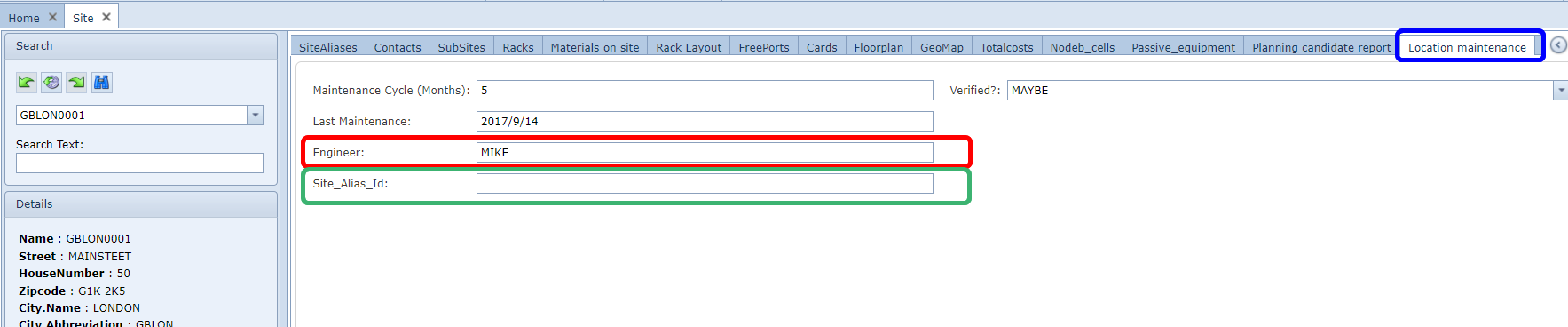
The tab (extrafield group) is called "Location maintenance" (see blue in screenshot) in GUI (display name),
but the main EXTRAFIELDGROUP name is "LOCATION_MAINTENANCE"
The field (extra field) "Engineer" (current value: Mike) needs to be updated to value "John" - see red
The field (extra field) "Site_Alias_ID" (current value: <empty>) needs to be updated to value "LON" - see green
All those fields are related to site name: GBLON0001
The bulkloader will look like:

Column E |
ObjectID |
Should contain the entity of where the extrafields are related to. In this case Site and then in [] the name of the entity. In this example it is Site[Name:GBLON0001] |
Column F & Column G |
Value;ExtraFieldId:(LabelText:'<extrafieldname>',ExtraFieldGroupId:'<extrafieldgroupname>') |
This is different than other bulkloaders, as the field header (row 1) should contain the name of the extra field and also the name of the ExtrafielGroup. In above example the Labeltext is "ENGINEER" and ExtrafieldGroupId is "LOCATION_MAINTENANCE" The values (JOHN and LON) need to be filled in row 2, and those fields belong to the site name filled in column E (GBLON0001) |
This bulkloader can be extended by adding more rows, loading values to other entity names,
so in this case to other sites.
It can also be extended by adding more columns for loading more field values of the same entities