In certain technologies like WDM and Fibre Cables there is a need to also display channels with other identifiers, i.e., wavelength and frequency.
The following screenshot shows an example of the two extra channel names given to a particular speed instance, apart from the default channel numbers.
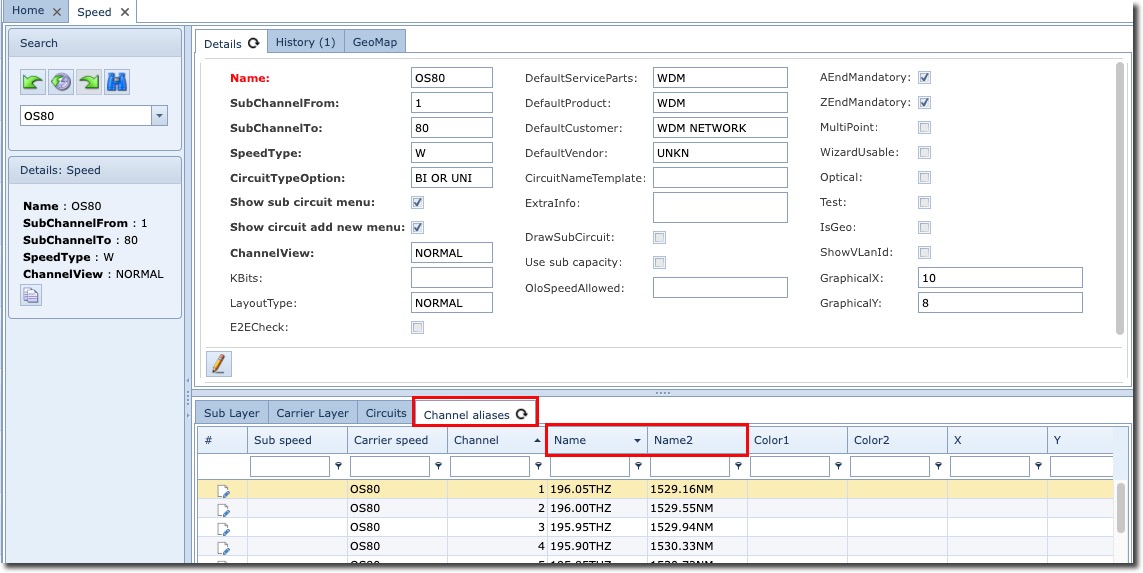
In the example above, the field contents of the extra Channel Alias names have been bulk loaded, rather than manually entering them in. Repetitive data entry is prone to data entry errors and is also time consuming.
Accessing the New Channel Alias feature

▪ |
The Channel Alias popup form is accessed from the SpeedForm Actions button bar, and selecting the New option, and then the New Channel Alias from the dropdown list |
▪ |
In the CarrierSpeed field select the required Speed instance in which to set up the Channel Alias functionality |
▪ |
In the optional SubSpeed field you may add a speed that ties a particular channel number/s to display the Channel Alias name/s of your choice for a given Sub Speed. When a circuit then occupies that given channel, that circuit will display the Channel Alias name/s |
▪ |
The Channel field represents the IMS system number given to each created channel alias instance. These start from and increase by one |
▪ |
The Name field is the first of two extra alias names that can be given to a particular channel |
▪ |
The Name2 field is the second of two extra alias names that can be given to a particular channel |