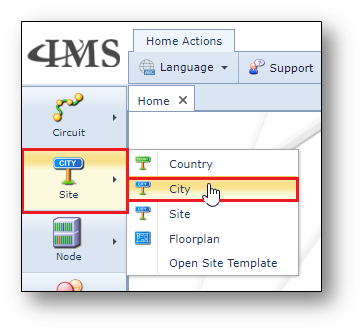
To open the Cities form, click in the menu on the left: Site > City
Find all cities:
To get a list of all existing cities in the database, click on button "show all" > Cities.
The list of cities will be visible:
Name: |
City name |
Abbreviation |
Short name of the city. E.g. NLAMS for Amsterdam |
Country |
Country name |
Province |
Province, Region or State |
District |
District name |
|
Open city:
To open a city, the search area can be used on the left top corner of the city form:
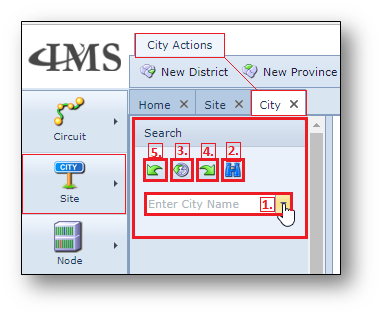
Field 1: |
This is a search field. You can search on city names, but also on part of the name |
Button 2: |
This button can be used to start the search. You can also press the enter button. |
Button 3: |
This will give a historical list of previous searches in this form. |
Button 4: |
This will directly go "back" to previous search |
Button 5: |
This will directly go "forward" to previous search |
Via the search field a city can be found and opened.
After a city is being opened multiple tab pages are visible:
Sites |
lists all sites / locations within the city |
Nodes |
lists all nodes / equipment installed in the city |
Circuits |
lists all circuits / connections / services starting or ending in the city |
Geomap |
shows all the sites in the city in a geographical map |
District |
lists all districts within the city |