The following instructions are for relating an OLO Circuit to A and Z side ends.
|
It is important to know that all Circuit instances in IMS have an A and Z end concept. Even though the 10GBE circuit has been associated with this OLO circuit, we still have to give the OLO this A and Z end information, after all, the 10GBE could traverse multiple sites in the network, whilst the OLO might only relate to a section or link of that overall path. |

From the opened OloCircuit form tab:
▪ |
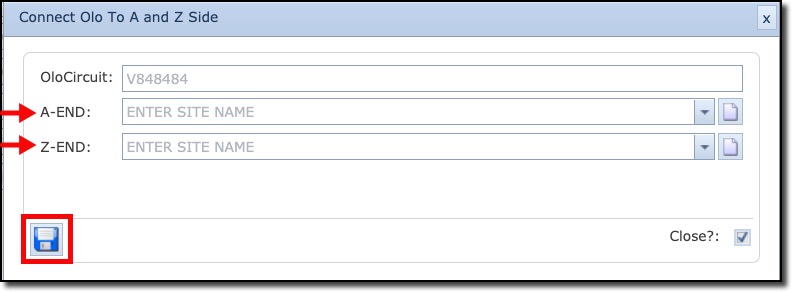
And from the OloCircuit Actions button bar, Click on the Connect Olo To A and Z Side button, causing the create popup window to appear |
▪ |
Complete the A and Z END Site fields accordingly – these could be prefilled if those fields have already been filled in when creating the OLO circuit. |
▪ |
Click on the Save button to create the A and Z side information |
|
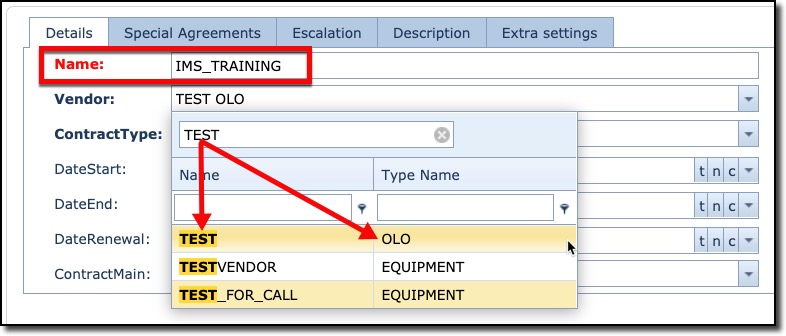
Should you receive an error message upon saving your work, it could be that the Contract selected in a previous stage, might not be related to the OLO object i.e., it might have Equipment or Circuit as the Contract type. You can verify this quickly by looking up the Contract instance for this OLO circuit to validate this |
The final step needed to ensure a successful exercise is to take a look at the 10GBE Circuit Port’s tab.
From the Circuit’s Ports tab we can see that the order of the ports is not in order.

To remedy this, you can double click on the individual fields under the Seqnr column to renumber them in accordance with the A and Z side direction of the 10GBE Circuit i.e., OLT site towards MPLS site.

And finally, we see the ports in the correct sequence and with the OLO details in the middle (Seqnr 2 & 3)
