In order to create cables using the Network Map feature, it is recommended to first hide (deselect) all Nodes and show (select) all DDF/ODFs before creating cables. Steps on how to do this are similar to those mentioned in the Trenches topic. |
To create a new cable using the Cable Connect feature in the Network Map:
▪In the Search Area of the Network Map, enable the No Action on Click option. This will prevent the selected object's popup window from appearing every time it is clicked
Should there be too many visible devices on the map, enable the Icon Clusters in the Map Display option (eye icon) in the Network Map features ribbon. The two cable endpoints (an ODF/DDF or Splicebox in a Manhole/Handhole) can now be selected as follows:
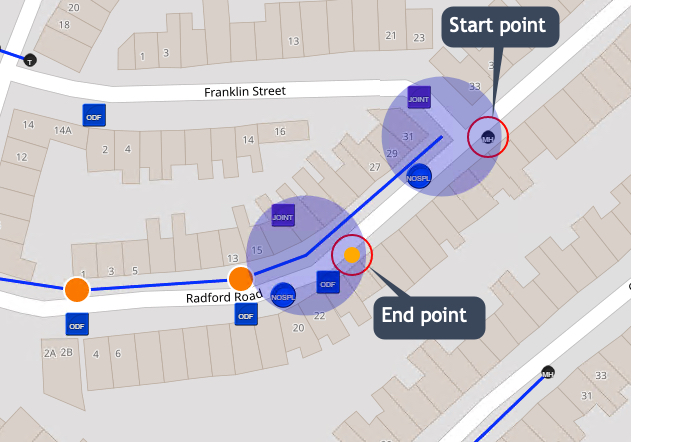
▪Left click on the starting point device. A red circle will appear around each object selected.
▪Hold down the Shift key and left click on the ending point device
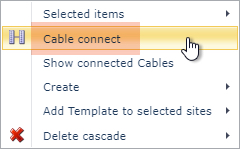
▪Right Click anywhere on the Network Map background - then from the drop down menus select: Cable Connect
The Add Cable Connect form popup window appears.
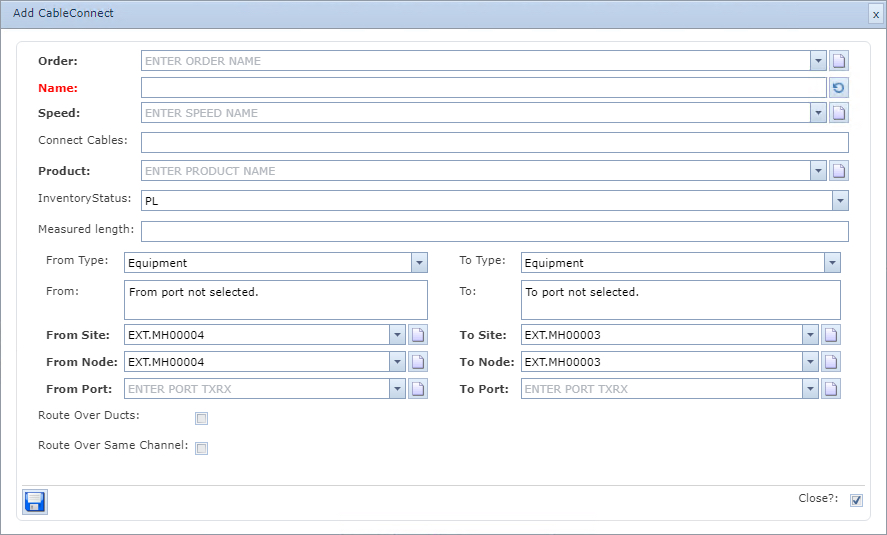
▪Fill in the form fields as required. For field details then refer to the field description table below.
▪Click on the Save icon in the lower left corner of the popup window to finish creating the Cable Circuit
Order |
Associated Order Number for this Cable |
Name |
The Name of this cable - Unique and Mandatory |
Speed |
The speed associated with this cable |
Connect Cables |
List of all sub cables permitted to ride over this Cable Circuit - separated by the pipe symbol | - typically CBLn. |
Product |
The type of cable, and usually this is set in the Product feature accessed in the Circuit module. The product can also be associated to the Speed object |
Inventory Status |
The status of this cable - default is planned (PL) |
Measured Length |
Optional field to store the length of the cable that is measured by the fiber works contractor |
From Type |
Options are: Equipment or DDF/ODF |
When creating a cable between an ODF/Splicebox to another ODF/Splicebox, set both From Type and To Type fields to the DDF/ODF option |
To Type |
Options are: Equipment or DDF/ODF |
From |
Read only field listing available ports for consideration that will be used when sub-circuits (CBL1 fibers) are created |
To |
Read only field listing available ports for consideration that will be used when sub-circuits (CBL1 fibers) are created |
From Site |
The starting site's location name |
To Site |
The ending site's location name |
From Node |
The starting node's name |
To Node |
The ending node's name |
From Port |
The starting port's name |
To Port |
The ending port's name |
Route Over Ducts |
When selected, IMS will create the cable over Duct Circuits - if available. |
For Cable Circuits involving DDF/ODFs, Manholes/Handholds, Spliceboxes, or Joints, then it is recommended to enable the Route Over Ducts option |
Route Over Same Channel |
When selected, IMS will add the fiber cable into the same channel numbers where there are multiple serial Duct Circuits of the same Duct Type |
The Route Over Same Channel option is typically only used for fiber to the home networks |