Introduction
This section is about describing and creating fiber networks using VC4's IMS.

Typical components and layout diagram for Fiber connectivity
The following is a list of IMS elements - modules and features - which are used and combined in order to model Fiber Networks.
oCable Entry Point
oManholes and Handholes
oTransition Points
oPoles
oTrenches and Parallel Trenches
oDucts and Sub Ducts - with Auto Routing
oCables - with Cable Connect, and Slack
oIcon Clusters
oSplice Boxes - Splice and Non Splice, Splicing Diagrams
oHighlighting Fiber Routes
Glossary of Terms
G-PON (x-PON) |
Gigabit Passive Optical Network |
FTTH / FTTP |
Fiber to the Home / Premise |
OLT |
Optical Line Terminal |
ONU/ONT |
Optical Network Unit / Terminal |
ODF |
Optical Distribution Frame |
OSP |
Outside Plant |
BTS |
Base Transceiver Station - mobile networks. |
Fiber Network models
IMS has Geographic Information System (GIS) capabilities to show the geographical routing of fiber and copper networks - Outside plant.
Layering components of a Fiber Network

Trench |
The lowest network layer and can be a hole in the ground or take an aerial route using poles |
Duct |
Fiber or copper cable duct. A duct can have multiple sub ducts, which is managed as fixed channels in the duct i.e., a DUCT24 containing 24 sub-ducts. Sometimes a duct may not be used where a cable is directly put into the ground or routed via poles |
Fiber/copper cable |
Fiber/copper cables with a certain capacity, for example: CBL96 for a 96fiber cable, CBL24 for a 24fiber cable, etc. Fiber tubes and fiber colors are also managed within the IMS definition of these fiber cables. |
Fiber/Copper |
Each single fiber/copper string is managed as a CBL1 connection carried within the fiber/copper cable. |
Active Network connection |
The active network connections such as: WDM, MPLS, SDH. These connections will then be layered within the fiber/copper (CBL1) connections. |
Example: Fiber Network to a building
The following diagram gives an overview of fiber connectivity towards a building using manholes or handholes, spliceboxes, and ODFs.

Example: Fiber Network to a building with a Splitter
As previously stated, the VC4-IMS application can manage each OSP element, including spliceboxes and splices. In the following screen shot an xPON network is shown with 1 or multiple splitters along the route from OLT (network side) to ONT (customer premise).

Connectivity layer components, starting from the Fiber level
Fiber |
Each single fiber is managed as a CBL1 connection carried by the fiber cable |
GPON |
The GPON circuit, with a speed of GPON, is the first active network connection layer. A GPON connection runs from OLT to Splitter, from Splitter to Splitter, or from Splitter to ONT |
ETH |
An ETH (Ethernet) connection is layered into the GPON carrier connections, from OLT to ONT |
V-LAN |
A V-LAN is layered into the ETH connection from ONT towards the OLT and ending on a MPLS node |
Services |
Depending on the configuration, subsequent connection layers will be services or ethernet connections |
Additional information on OSP Geo models
Transition points
A Transition Point (TP) is used where a trench route diverges as can be seen in the next diagram.
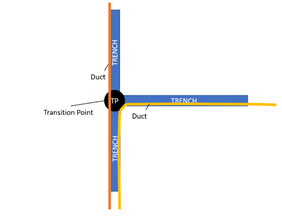
A TP is managed as a TP Site and Node object. This allows for terminating Trench connections.
Manholes or Handholes
Like TPs, these are also managed as Manhole/Handhole Site and Node objects to allow Trench connection terminations but also Duct connections especially where butterfly overviews are needed.
Cable Entry Point
A Cable Entry Point is modeled as a Node object and linked to a Building or BTS site. This allows to terminate fiber routes at a building location or BTS site.