The following steps are for creating a SubSite (sub-location) - i.e., a room - within a building that has already been created.
Locate an existing Site in which a Room is to become a SubSite of it.
From the Site Form Actions Button bar:
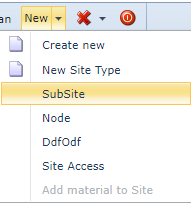
▪Click on the New option down arrow
▪From the dropdown list select SubSite
Fill in the required fields in the popup window provided.
Some fields of information are already populated, these are inherited from the now Parent Site.
▪Ensure that the mandatory fields called Name, Room and Floor are completed as well
▪Click on the Save icon in the lower left of the popup window