From the DDF/ODF Actions button bar select the New icon to open the New DDF/ODF popup
window.
All mandatory fields are required.
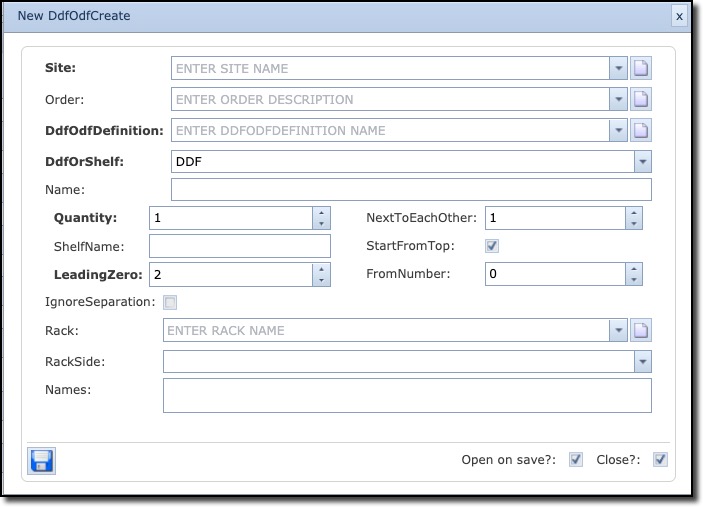
The following describes the DDF/ODF fields of information:
Site |
Site/location name for this new DDF/ODF/PP |
|
Order |
Order (work pack) number that is related to this new DDF/ODF/PP |
|
DdfOdfDefinition |
DDF/ODF/PP type (definition) |
|
DdfOrShelf |
Option to determine if … |
|
DDF |
This DDF/ODF is one unit |
|
Shelf |
Part of a multishelf system |
|
Name |
Name of the DDF/ODF/PP. Auto generated if naming convention is set by the IMS administrator |
|
Quantity |
Number of shelves |
|
Shelf name |
Name of the shelf |
|
LeadingZero |
This field indicates how many leading zeros must be used in the DDF/ODF/PP shelf name. |
|
NextToEachOther |
This field indicates how the shelves can be positioned in the rack. If set to default (1) Then they are placed vertically only on top of each other Else, it allows for n number of shelves side by side in the multishelf system |
|
StartFromTop |
This field indicated if the shelves must be placed starting at the top or bottom of the rack |
|
FromNumber |
This field identifies the first shelf number that must be created. |
|
IgnoreSeparation |
This field ignores the separation symbol (delimiter) in the DDF/ODF/PP shelf name. Often used when only creating one shelf with a specific name |
|
Rack |
Rack name where DDF/ODF/PP must be placed in |
|
RackSide |
Front or Back side of rack |
|
Names |
A pre-view of the ODF shelf names to be generated - Read only. |
|
|
The DDF/ODF name/s will be automatically generated based on the name field or if name field is empty, the standard naming convention and the fields Quantity and LeadingZero are used. |
