The following set of instructions will only show the steps, or general mechanism, to generate a spreadsheet based on predetermined IMS spreadsheets, and then load the same back into IMS with your completed data set.
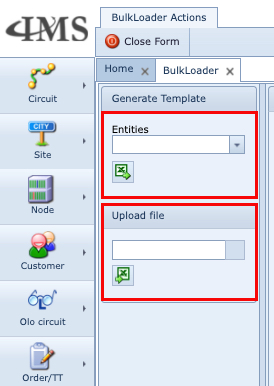
To create the data:
▪Search from the first dropdown field list called Entities for TelephoneNumber (in this example)
▪Click on the green spreadsheet icon underneath the Entities label to generate the blank input form needed for data completion
▪You would then fill in the spreadsheet with the required new or updated data as required and save it to your drive – as stated, we will not be completing the spreadsheet with any data for this exercise, but rather just show the mechanisms or routine.
To load the data:
▪Click on the Upload File field and search for and upload your completed spreadsheet from your drive
▪Click on the green spreadsheet icon to start the upload process.
▪Any errors or messages will be displayed on the TNM output window