From the IMS main menu:
▪Select the Node object
▪From its drop-down list, click on the Number management option
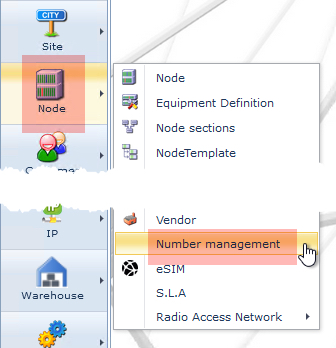
This opens the TelephoneNumberRangeForm Actions tab

The following features are available from this Actions tab:
Show all types |
Displays existing Telephone Number Range Types – (see note below) |
|
Create New |
Form to create a new TN Range |
|
Close Form |
Closes the current TN Range tab |
|
Search – drop down list |
List or type in your text to search for a required TN Range name |
|
Search text – field |
Type in whole or part text to search for a required TN Range name |
|
4 Search Icons (Left to right) |
Previous |
go back to the previously viewed object |
History |
stores the last 20 viewed objects |
|
Next |
navigate to the next viewed object – provided you have used the Previous button |
|
Search/Clear Screen |
left click to search what is filled in the Search Text field or right click to clear the screen |
|
|
It is worth mentioning at this stage that a Telephone Number Range Type (TNRT) is required when creating a Telephone Number Range (TNR), as it determines the country code and how many area code fields are required as part of the TNR. There is a separate chapter dedicated to the TNRT. |