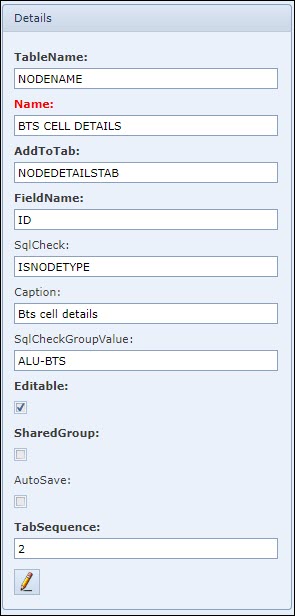
Table Name |
Name of the database table to which the extra fields must relate to |
Name |
The name of this Field Group - does not necessarily have to be the same as the Caption name, which will appear in the user interface |
Add To Tab |
The parent tab name to which this Extra Field Group tab must be added to |
Field Name |
Name of the database table ID field |
Sql Check |
Any sql script to be performed - optional, selected from a dropdown list - this feature is used in conjunction with the SqlCheckGroupValue feature below. |
Caption |
The name of the Extra Field Group tab - tab label name |
Sql Check Group Value |
Filtering values against which the Extra Field Group will be displayed i.e., speeds of only 10GBE | 1GBE pipe symbol separator - this is a Group level feature. |
Editable |
Select if end users can modify these Extra Field Group fields - alternative is for view only fields |
Shared Group |
Select if this Extra Field Group is used in the Order/TT - only suitable for Order/TT |
Auto Save |
Select if extra field data are to be saved once entered by the user - applies only to IMS3 |
Tab Sequence |
Numeric value determines the horizontal position this tab will take after the system default tabs i.e., 3 indicates it will be the third tab after the last system tab |
Edit [Pencil Icon] |
Option to modify the Extrafield Group details |