This topic describes:
oThe contents of the Extrafields Tab
oSqlCheck field example
The Extra fields tab contains all the parameters and attributes required for each extra field of information as well as its position information in their layout panel.

Form fields and descriptions:
Sql Check |
A drop down list of existing SQL scripts that can be applied at individual field level, but typically a new SqlCheck instance would be created for each new ExtraFieldGroup field instance by using the Add new sql check option in the button bar. For a list of all existing Sql Checks, click on the All Sql checks option in the ExtraFieldGroupForm Actions button bar |
When you do not wish to implement an SQL statement here, but rather just use the SqlCheckValue field contents, then assign the value of ISTRUE in this SqlCheck field, which will validate for a true condition of the SqlCheckValue field contents. |
Sql Check Value |
IMS script symbols which can be used in conjunction with other fields (extra fields) to create condition statements |
Value Type |
The field’s property. There are 9 to choose from: Checkbox, Date, Date Time, Fieldname, Formula, Memo, Numeric, Query, Text. |
If QUERY is used then it operates in conjunction with an SQL script statement, in the Sql Check field, which is designed to populate this field with the query statement’s return value |
Label Text |
The field’s name as it will appear in the layout panel |
Mandatory |
Checkbox to indicate if the field is mandatory - select if mandatory |
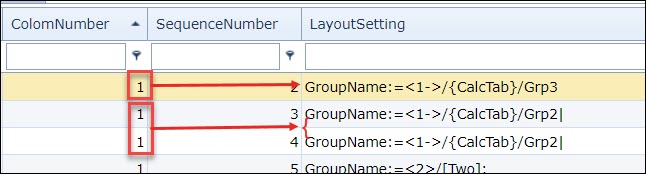
Column Number |
The column position (vertical placement) for this field in the layout panel |
Sequence Number |
The position of this field with respect to other fields in the layout panel - this also applies if the field is in a set group of fields i.e., boxed group or sub-tab. |
Layout Setting |
Determines how the extra field will be placed in the layout panel – typically used to create sub divisions of extra fields i.e., a boxed group or sub tab. Should the Layout Setting feature be used, then the value in the Column Number field will now only apply within the context of the field group being referenced and not the layout panel as seen in the4 next screen shot |
|
ComboList |
List of user defined values separated by the pipe symbol. It can also display a dropdown list derived from a SQL query, example as follows: Select Location from Locations – this will produce a dropdown list of all sites. Select Nodename From Nodename Where Nodelocation ='[#Site#]' Order By Nodename – this will produce a list of all nodes contained within the site as entered in the extra field Site field |
DefaultValue |
A user defined value that will appear in the related field |
Validation |
Validation for data entered at run time … i.e., date entered must be in the future – or alternatively past i.e., DateValidation(ValidationType:=Past) |
Formula |
For fields that are derived or require a user defined formula i.e., adding two other fields together i.e., [#Temp A#]+[#Temp B#] |
ValueFromSql |
A field that derives its value from an SQL query i.e., the circuit name opened in the current form - i.e., SELECT CIRCUITNAME FROM CIRCUITS WHERE #REPLACE# |
TooltipText |
A used defined hover over tip of information for the given extra field |
SqlCheck field example and description:
The following is a description of an SqlCheck example called ISSPEED and its SqlCheckQuery which can be found by clicking on the All sql checks option in the ExtraFieldGroupForm Actions button bar
ISSPEED
SELECT 1 FROM CIRCUITS where '|' || '#REPLACEVAL#' || '|' like '%|' || SPEED || '|%' AND #REPLACE#
SELECT 1 |
1 refers to a boolean value which means this query will take effect if the result of the query is positive or 1. If the result was negative, the boolean equivalent would be 0 and therefore this query would not take effect. |
CIRCUITS |
This is related to the TableName field as shown in the Details section in the above screen shot. The SQL select query will be run on the CIRCUITS table in IMS |
'|' || '#REPLACEVAL#' || '|' |
The ‘Pipe’ symbols let the SQL query know that there could be more than one value to consider i.e., more than one speed – different speeds will have a pipe symbol between them. |
|| '#REPLACEVAL#' || |
The two || symbols are like containers for IMS commands like REPLACEVAL which lets the query take the values contained in the SqlCheckGroupValue field, in this example 10GBE to perform the comparison |
like '%|' || SPEED || '|%' |
The % symbol is the SQL wild card symbol and the two | pipe symbols are letting the SQL query consider more than one value of speeds if necessary |
#REPLACE# |
This REPLACE IMS command will take the ObjectId of the open IMS screen/form – a circuit form screen in this case, and therefore its CircuitID |
The SqlCheckValueList column has been deprecated |