
On an opened Floorplan instance, the following functionality is available from the Floorplan Actions button bar:
|
Create SVG |
Produce an SVG file of the Floorplan layout (non-photographic imagery File). Appears on the lower left of the window as a PDF. |
|
|
Paper format |
Output formats |
A4 |
A3 |
|||
A2 |
|||
|
Orientation |
Display formats |
Portrait |
Landscape |
|||
|
New rack |
Create a new rack for this floorplan |
|
|
New ddfodf |
Create a new DDF/ODF for this floorplan |
|
|
Add Tile |
Add a new tile to this floorplan |
|
|
Cable circuitPath |
From the Cables in floorplan tab, selecting cable instance/s (check box), produces cable graphic layout in a new rightmost column – see screenshot below. |
|
|
Show selected racks |
In a similar fashion as Cable circuitPath, this feature displays graphical rack layouts in a rightmost column, once they have been selected form the Items On Site tab, then Racks or DDF/ODF tabs |
|
|
Prints the floorplan drawing |
||
|
Close Form |
Closes this entire Floorplan tab leaving only the Home tab displayed |
|





The following screenshot depicts the process flow to view the graphical output from the Cable circuitPath button bar option.
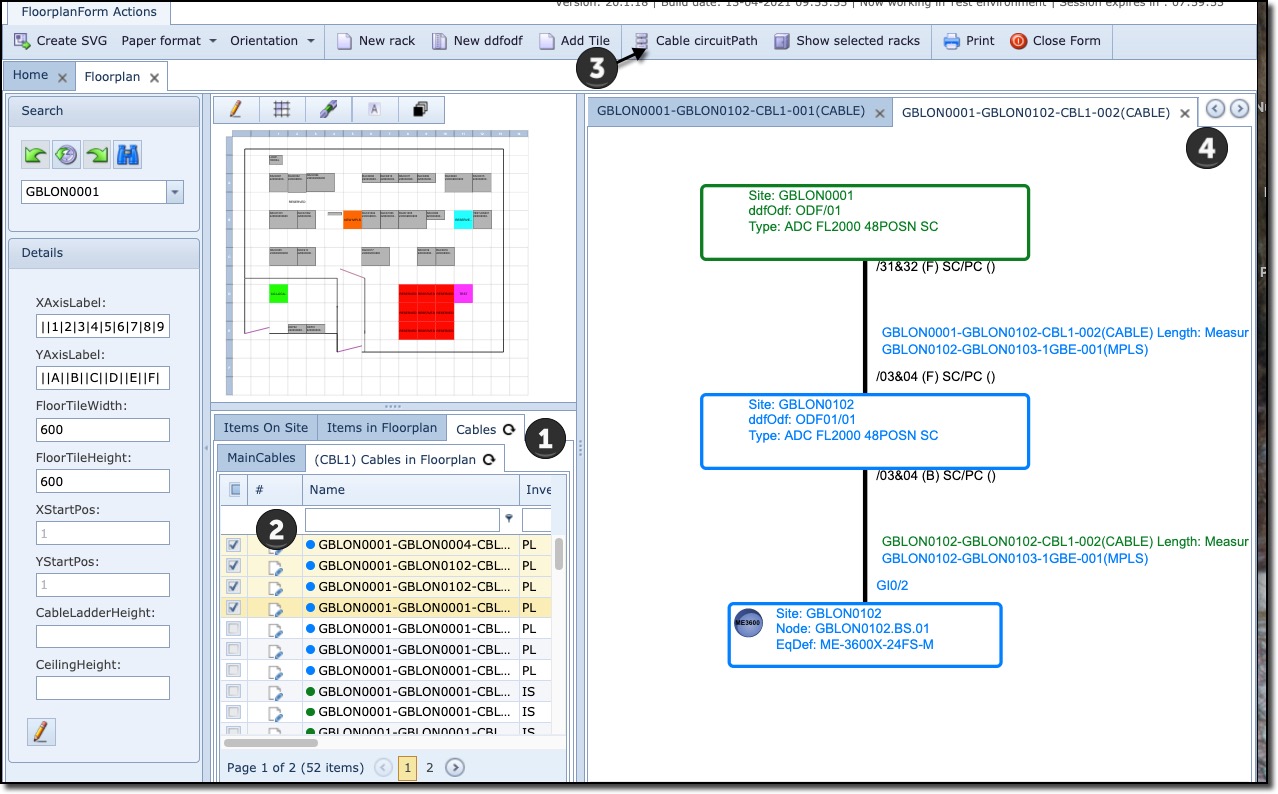
1 Click on the Cables in floorplan tab |
2 Select cables to be represented in graphical format |
3 Click on Cable circuitPath from the button bar |
4 If more than one cable has been selected, use the left/right arrows to toggle through sets of graphical displays |