** WORK IN PROGRESS ** This section is yet to be updated to the newer version of IMS Feature location, commands, instructions, and screen shots may not appear the same if you are using a newer version of IMS |
Suppliers or manufacturers of equipment and OLO circuits must be registered before assigning the vendor to equipment type or leased line/OLO.
Vendor related agreements can also be registered in IMS i.e., SLAs and Contacts.
Search for a Vendor
From the IMS Main Menu:
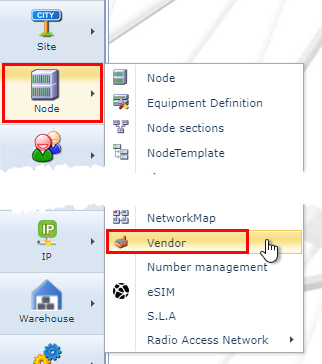
▪Click on the Node option followed by the Vendor option in the dropdown list
This opens up the Vendor Form from which:
▪In the search area type in the name of the Vendor in the search field
▪Or click on the down arrow in the search field and select a vendor from the dropdown list provided

Vendor details appear in the Vendor Form.
Create a Vendor
From the VendorForm Actions button bar:
▪Select the Create new option
This opens up the Create new Vendor popup window.
Fill in the required fields in particular the mandatory ones.
▪Click on the Save icon in the lower left corner of the popup window.
