Full documentation to follow soon
As of IMS release 22.9 it is possible to auto Bulk Load, up to a maximum of 10 Bulk Load files, on a scheduled basis using the Scheduler module. The Scheduler module can be found in the IMS Main Menu under the System option's drop down list.
Bulk Loading Permissions
In order to schedule any Bulk Loading jobs (auto loading), a User Group's Permission Settings must first be enabled. This is achieved by accessing the UserGroupPermission Tab as follows:
From the IMS Main Menu:
▪Select System | Users | User Groups
This opens up the UserGroup Form
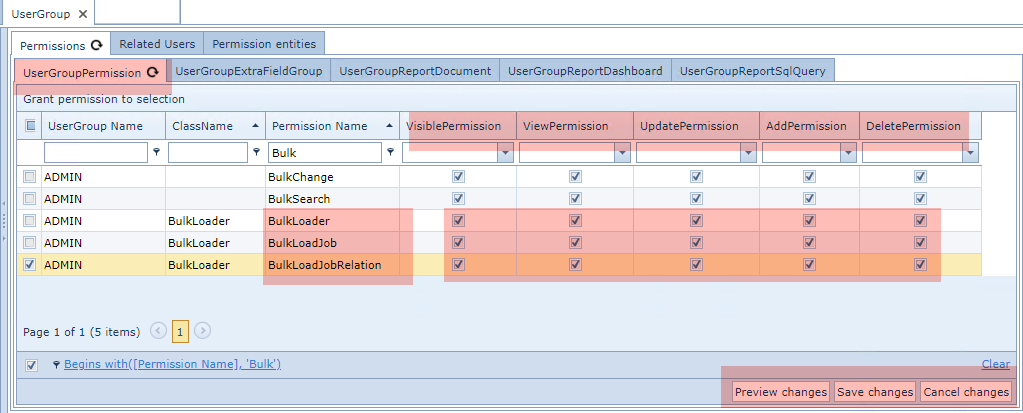
From the Permissions Tab and then in its nested Tab called UserGroupPermission ...
▪Type in Bulk in the Permission Name column filter field and press the Enter/Return key - you should see the Permission Names listed as in the above screen shot
▪Ensure that the Permission Name options: BulkLoader, BulkloadJob, and BulkLoadRelation are enabled in their respective permission columns, right of the Permission Name column
▪Click on the Save Changes option button in the lower right corner