This topic describes:
oAccessing the Vendor module
oSearching for a Vendor
oHow to create a new Vendor
Suppliers or manufacturers of equipment and OLO circuits must be registered in IMS before assigning the vendor to equipment type or leased line/OLO.
Vendor related agreements can also be registered in IMS i.e., SLAs and Contacts.
Access the Vendor module
From the IMS Main Menu:
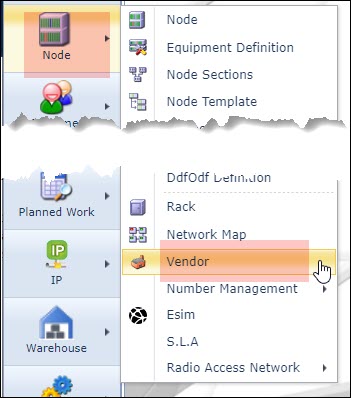
▪Click on the Node option followed by the Vendor option in the dropdown list
This opens up the Vendor Form.

Search for a Vendor
▪In the search area type in the name of the Vendor in the search field
▪Or click on the down arrow and select a Vendor from the dropdown list provided

Vendor details appear in the Vendor Form.
Create a Vendor
From the Vendor Form Actions button bar:
▪Select the Create new option
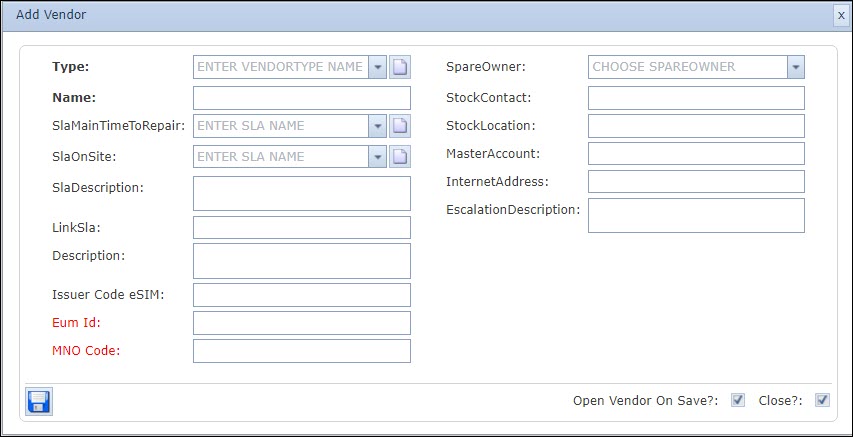
This opens up the Add Vendor popup window.
Fill in the required fields in particular the mandatory ones.
▪Click on the Save icon in the lower left corner of the popup window.