Introduction
The Warehouse feature offers the ability to manage the flow of network assets (material) from the point of ordering to its delivery on site, and finally its de-installation. When combined with IMS Inventory, the Warehouse feature offers complete network asset life-cycle management.
Although warehouse assets may include IMS standard network assets like shelves, cards, and distribution frames it is also capable of managing network and site related items like power supply units, fans, office furniture, electronic equipment, etc.
It's important to remember with the Warehouse feature, that almost all material activity revolves around the Stock object. Material moves in and out of Stock by applying a series of actions to it, which in turn updates the material's status, providing the user with an understanding of the materials progress through the Warehouse system.
Be aware that the section called "Finance and Revenue" relates to the Warehouse module inasmuch that Invoices, Payments of Invoices, and Revenue details can be associated through the Purchase Order feature. Furthermore, IMS can be integrated with Enterprise Resource Planning systems in order to facilitate overall business processes and company aims.
Functional overview
The warehouse feature offers the following capabilities:
▪Stock management
▪Material ordering process through Purchase Order functionality
▪Material Templates
▪High turnover material management - i.e., cables
▪Full warehouse to network inventory relation and tracking - if both of these are implemented in IMS
The IMS Warehouse is designed with a certain flow in mind as shown in the following diagram. This diagram is a useful reference point to bear in mind throughout the following chapters.

Non-standard IMS assets that have been booked out of the warehouse and into the IMS inventory, will appear under the Site object, listed under the tab called Materials on site.

Main Warehouse Processes
There are several work processes that can be managed and monitored using the Warehouse feature, and can be seen at a high level in the diagram above called Main functional processes.
These work processes include the following, and will be explained and documented in detail in their own sections :
➢Getting material into Stock
➢Material leaving Stock
➢Handling Defective material - coming in from the network or purchased new but found to be defective
➢Sale of material - excess or legacy material - includes disposal of material
➢Managing Cable Stock - separate registration from regular material
➢Creating material types - to register and manage in stock
➢Creating required locations - within the Warehouse i.e., Spares, Disposal, For Sale, etc.
Accessing Warehouse Forms
Accessing the various forms, for the Warehouse module, is accomplished from the IMS main Menu:
▪Click on the Warehouse option and in the drop down list select the required sub feature
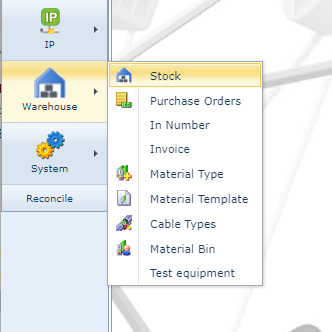
The following is a short description of all the components in the Warehouse feature list:
Stock |
Stock represents the overall grouping or classification of material types by some arbitrary business case i.e., Spares, Used, New, or even some network classification like Core or Edge. |
Purchase Orders |
A purchase order (P.O.) is required when new material is needed. Furthermore a P.O. allows for tracking the ordering and delivery process, as well as helping to control the budget. |
In Number |
In stands for Investment Number. An IN is created to include a budget allocation for ordering materials through POs. An IN can be associated to one or many POs. An IN is usually created for a whole project, to track the overall project budget in relation to its associated Purchase Order/s. |
Invoice |
Used in conjunction with P.Os. to keep track of what has been invoiced and what has been paid. |
Material Type |
Setting up of the Warehouse material that will be tracked i.e., SFPs, office furniture, IMS inventory cards, IT devices, etc. |
Material Template |
Used when regular groups of material types are combined to make up an order - i.e., Racks, Cabinet, Power Unit, Bolts, and assembly tools. |
Cable Types |
Setting up of material related to cables. These are handled differently than regular Material Types. Cables can be of many varieties: Ethernet (CATn), Fibre optic, Copper, etc. including their lengths, connector types, etc. |
Material Bin |
User defined Bin names for disposal of Material Types i.e., Sales bins, Waste bins etc. |
Test Equipment |
Used for managing and tracking the whereabouts of network test equipment |