IMS handles Shapefiles and Google Keyhole Markup Language (KML), and its compressed version KMZ as features of the Network Maps component.
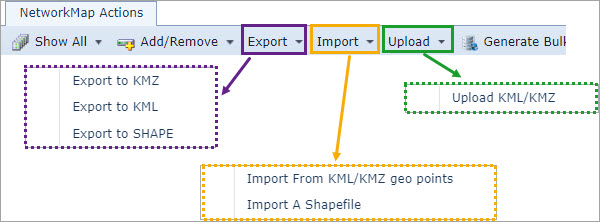
The action options for KML/KMZ and Shapefiles can be found in the Network Map Actions button bar as Export, Import, and Upload, as shown in the following screen shot.
Export
The options available in the Export drop down list are:
Export to KMZ |
Exports the current network map view to a KMZ file to the user's download folder |
Export to KML |
Exports the current network map view to a KML file to the user's download folder |
Export to Shape |
Exports the current network map into multiple shape files (circuits, DDF/ODFs, Nodes, Sites) to a zipped file to the user's Download folder. These files, in turn, can be incorporated into other third party systems. |
Import
The options available in the Import drop down list are:
Import from KML/KMZ Geo Points |
Imports other VC4-IMS generated KML/KMZ files |
Import a Shapefile |
Imports a Shapefile |
Upload
Upload KML/KMZ |
Upload KML/KMZ is a function to upload non-VC4 IMS KML/KMZ files to the application server to have the KML/Z file as a background layer only |