LATA stands for Local Access and Transport Area.
The LATA feature is accessed from the IMS Main Menu:
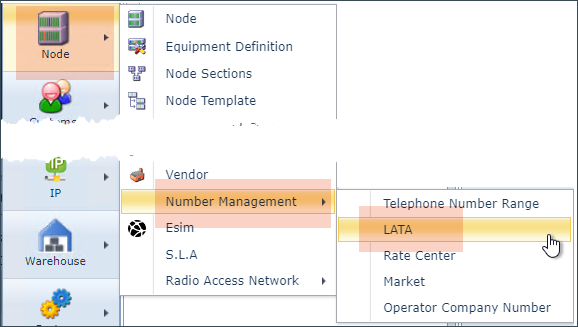
LATA form
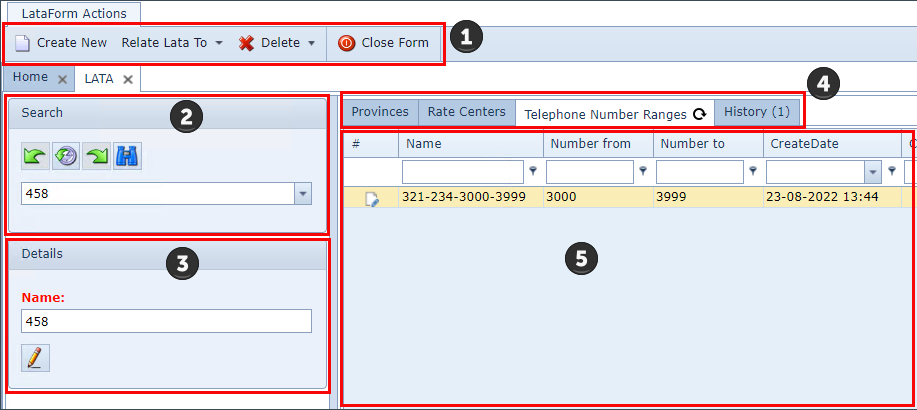
When opened, the LATA form shows the following information:
|
LATA form actions button bar - further information given below |
|
The search area to locate existing LATA instances |
|
LATA summary detail |
|
Tabs containing lists of LATA related information - when a LATA is related to other Rate Centers, TNRs, or Province/States, tabs will appear as shown in the above screen shot. The History tab is always present and contains a log of all activity for the LATA. |
|
The detailed information for the LATA's active tab |





LATA Button Bar
Create New |
Option for creating LATAs |
||
Relate LATA to |
LATAs can be related to the following IMS objects: oProvince/State oRate Center
|
||
Delete |
This option deletes the LATA instance - options are Yes and No |
||
Close Form |
This option will close the open LATA instance |
Relating a LATA
Relating a LATA to a Province/State or Rate Center is achieved from the LATA Form Actions button bar:
▪Select the Relate Lata To option
▪Choose either Province (Province/State) or Rate Center - a popup window appears
▪Select an instance from the available drop down list of Province or Rate Center fields accordingly
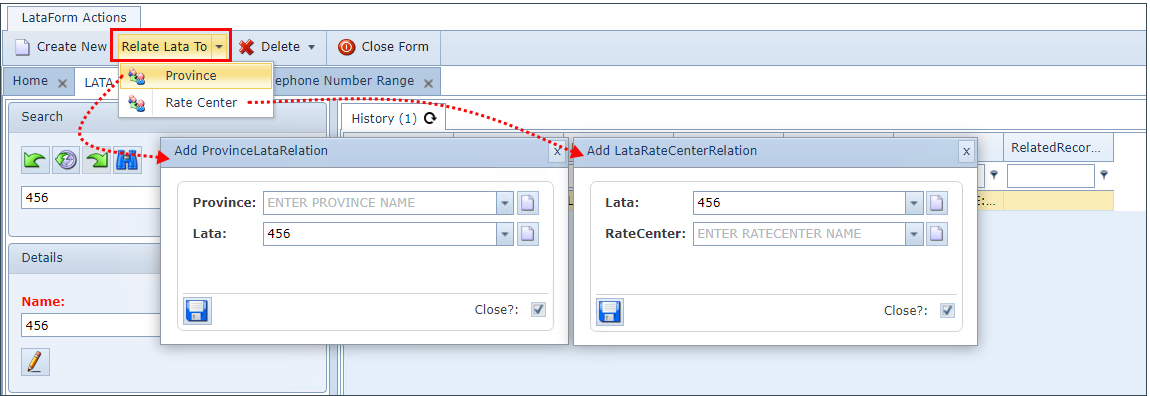
▪Click on the Save icon in the lower left corner of the popup windows to complete the task