The Material Bin is used to help sell or dispose of old or faulty material. A bin is also associated with a Stock instance.
More information on how to use Material Bin can be obtained from the section called Selling / Disposing of Material.
Creating a new Material Bin is achieved by first accessing the Material Bin option from the Warehouse module's drop down list of options and then selecting the Create new option from the MaterialBinForm Actions button bar
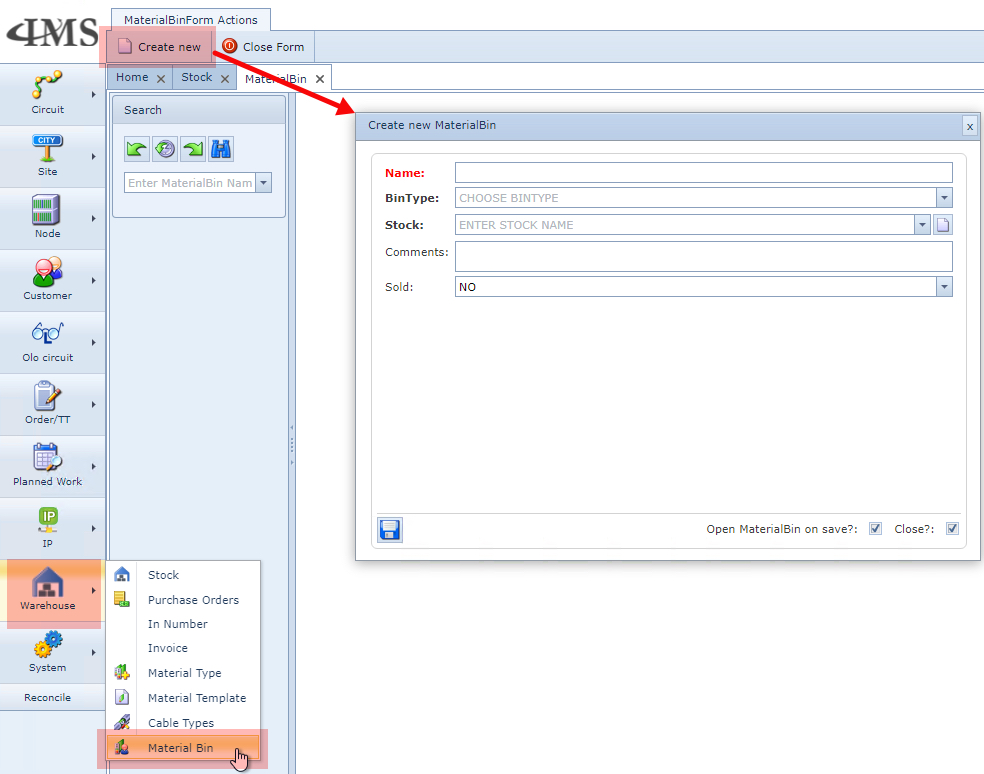
The new MaterialBin form contains the following fields:
Field name |
Description |
Requirements |
Name |
Name of the material bin |
Mandatory and unique |
Bin Type |
Type of the bin, for example sale or waste - These can be managed through the Combo Box feature. |
Mandatory |
Stock |
Stock the bin is related to |
Mandatory |
Comments |
|
|
Sold |
Yes or No, indicating if the bin is sold and the associated material items have left the stock |
|