The Test Equipment feature allows adding valuable Test Equipment to the Warehouse system for tracking availability, whether it is free or being used.
Test Equipment is separate from the regular Warehouse stock material.
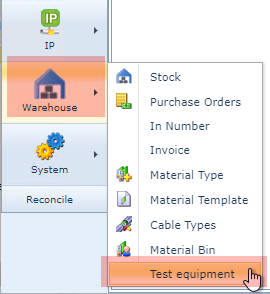
Test Equipment is accessed from the IMS Main Menu under the Warehouse module and by selecting the Test equipment option in the provided drop down list.
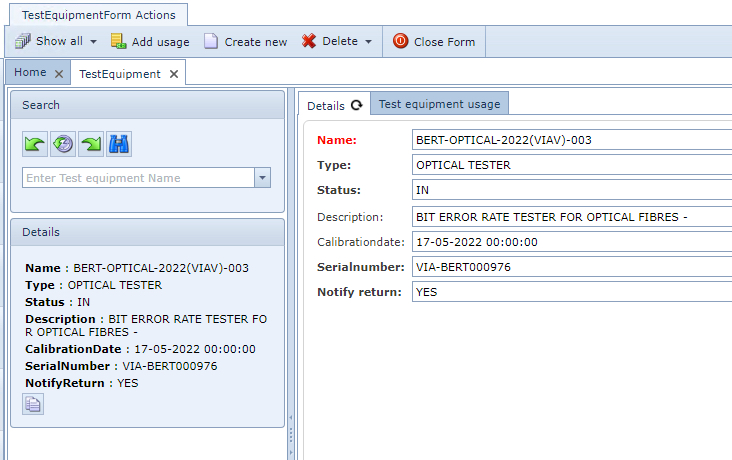
The Test Equipment form contains the following fields of information:
Field name |
Description |
Requirements |
Name |
Name of the Test Equipment |
Mandatory and unique |
Type |
User defined type of the testing Equipment, for example Optical, Copper, Fault Locators, Light Sources, etc. |
Mandatory |
Status |
Status of the Test Equipment - option is Out or In |
Mandatory |
Description |
Free text field for a brief description of the Equipment |
Optional |
CalibrationDate |
Date it was last calibrated |
Optional |
SerialNumber |
Device's serial number |
Mandatory |
Notify return |
Option of Yes or No |
Mandatory |
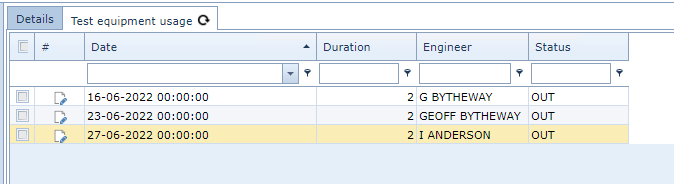
The Test Equipment tab contains a log of how many times the Test Equipment was used as well as future required usage dates and times.
Entries to this tab are result from using the Add usage option in the TestEquipmentForm Actions button bar.