Introduction
In IMS, a Cable Entry point forms part of the design method for outside plant and its connectivity (Trench routes). A Cable Entry point is made up of various IMS objects and can be conveniently created using object templates and an equipment definition:
oSite template with equipment (node / DDF/ODF)
oequipment is derived from Node Templates
oand the Node Template names have Cable Entry mentioned in them, and their Equipment Kind field is of type CABLE ENTRY - refer to the following 3 screen shots for examples:

Equipment Definition with Name and Equipment Kind containing Cable Entry

Node Template containing an Equipment Definition with Cabel Entry

Node intsance whose Equipment Definition is of a Cable Entry type
Create a Cable Entry Point
In order to terminate a TRENCH route into a building or BTS site, the building or BTS site must have a Cable Entry point. A cable entry point can be created using the following methods:
The Node form:
▪Select the New node button
▪From the popup window ensure that the node contains a name with Cable Entry in it but also whose Equipment Kind field is CABLE_ENTRY
▪Ensure that the appropriate Site name selected represents the Cable Entry point i.e., a building or BTS site

The Network Map - method 1:
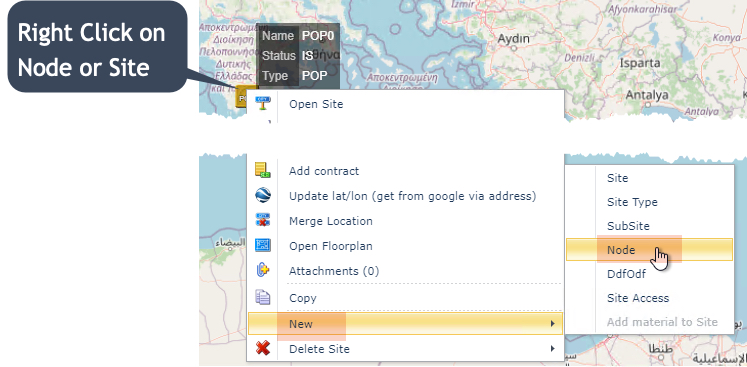
▪On a site or node object, right click and select the New option and then Node
▪From the popup window ensure that the node contains a name with Cable Entry in it but also whose Equipment Kind field is CABLE_ENTRY
The Network Map - method 2:

With Site templates that contain Cable Entry type equipment (Nodes / DDF/ODFs) then:
|
Left click on the required node where the new Cable Entry site will be located - a red circle will appear around the node |
|
Right click nearby on the map background - not the node. An options window appears |
|
Select the "Add Template to Selected Sites option from the list |
|
Select the required site template option that contains Cable Entry type equipment |




To verify the outcome, Left click on the node on the map, followed by the Open Site option. Then select the Equipment tab to list the new Cable Entry equipment.