When a connection from one location to another location is provided by an OLO (Other Licensed Operator)
provider, this is called an OLO circuit in IMS.
Often this type of connection is also called a “Leased Line”.

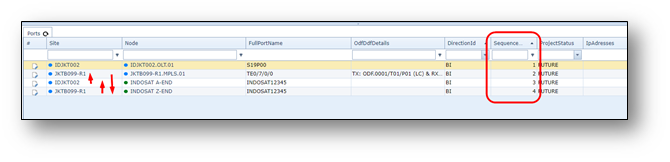
Leased Lines may be delivered to your company in a so called “interconnect”, see screenshot below.

OLO Circuits / Leased Lines / Interconnects are managed in the OLO Circuit form.
The OLO circuit is a different object than the normal circuit as the OLO circuit does not contain your own
network details.
In the OLO circuit details the details of the provider are registered to give connectivity details of the leased line
or interconnect, as well as the related contract and price details.
Open OLO Form
To open the OLO form use the menu on the left.
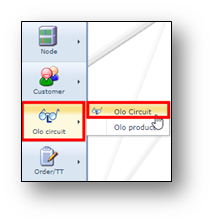
Find OLO
To find an existing OLO/Leased Line/NNI connection, use the search field on the left.
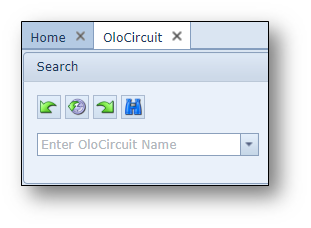
OLO Circuit Actions button bar
Once an OLO/Leased Line connection is opened, the following button bar is visible:

Short explanation from left to right:
•Show all Olo’s |
Show all OLO’s in the database in a list |
•Add new contract oloproduct relation |
Create a new relation between a contract and OLO product |
•Relation To Order/Ticket |
Relate OLO circuit to an order or ticket |
•Add alias |
Add an alias name to the OLO circuit |
•Connect Olo to A and Z side |
Connect the OLO circuit to the A- and/or Z-side of the related circuit |
•Focus |
Set the OLO circuit in focus |
•Copy |
Copy the OLO circuit name |
•New |
Create a new OLO circuit |
•Delete |
Delete the OLO circuit |
•Close Form |
Close the OLO circuit form |
Create new OLO Circuit
To create a new OLO Circuit, press the new button in the OLO Circuit Form 
A pop-up window appears:
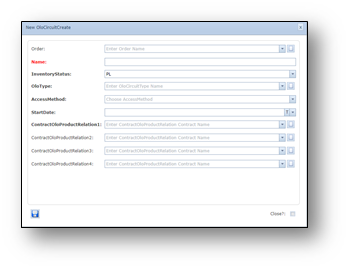
Below a description per field:
Order |
(Work) Order number |
Name |
Name of the OLO circuit |
InventoryStatus |
Status of the OLO circuit |
OloType |
Type of OLO connection, e.g. Leased Line, NNI/Interconnect |
AccessMethod |
Access Type, e.g. DSL, Leased Line, Telephone Line. This pull down can be set by an admin user in the combobox general functionality |
StartDate |
State date of the OLO circuit lease |
ContractOloProductRelation1 |
The Contract-OLO-Product relation is the relationship to the contract of the OLO circuit and related OLO product. The list can be managed via the “new” button next to the entry form. |
ContractOloProductRelation2 / 3 / 4 |
Same as previous. Easy fill in, in case of multiple Contract-OLO-Product relations, such as “port price” and “loop” price. |
Connect OLO Circuit to a Circuit
To relate an OLO Circuit to a (normal) circuit, copy the circuitname and paste it into the circuit field.
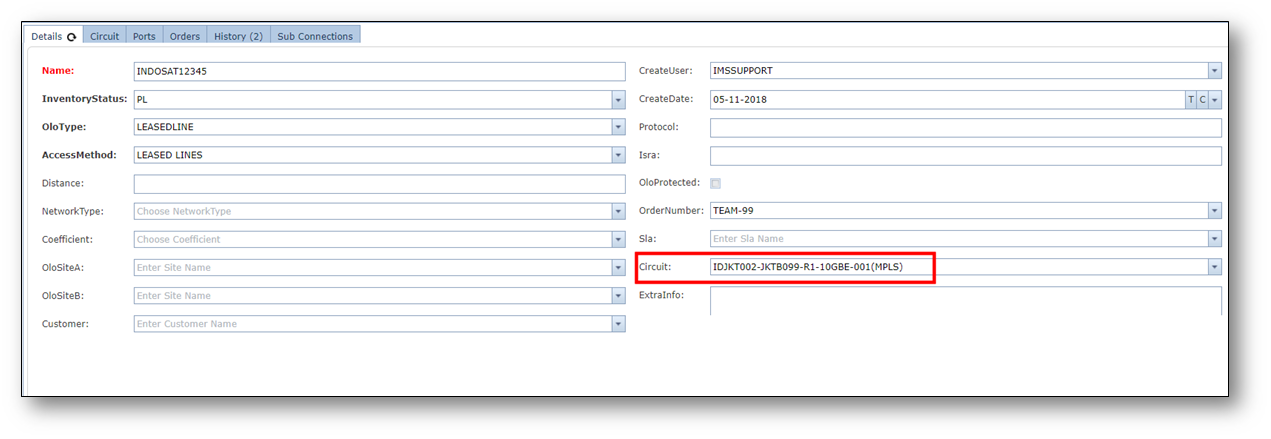
And press save.
Connect OLO Circuit to A and Z side
To relate an OLO Circuit to a the A and Z side, press button “Connect OLO to A and Z side”.
A pop-up window appears.
Fill in A and/or Z location and press save.
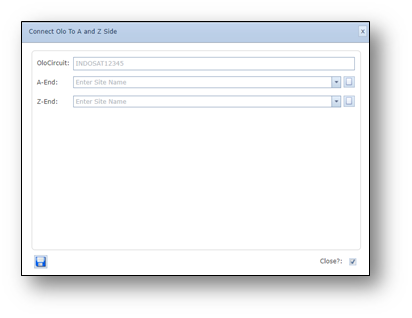
Please notice that you have created virtual OLO ports to the connection (not the OLO circuit).
You still may need to change the sequence numbers of the ports in the connection form.
Steps:
- Open connection form with the circuit that has the OLO circuit related
- Refresh the ports tab page
- Check if the OLO virtual ports have the correct sequence
| - | Correct the sequence numbers by double click on the sequence number, change and click outside |
the row.
Example: