** WORK IN PROGRESS ** This section is yet to be updated to the newer version of IMS Feature location, commands, instructions, and screen shots may not appear the same if you are using a newer version of IMS |
The POST command is used to add a new object into IMS database.

click the 'TRY IT OUT' button
the syntax of the command:
{
"id": "string",
"propertyAndValues": [
{
"property": "string",
"value": "string"
}
]
}
Fill in:
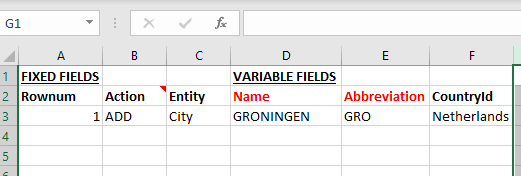
Entity = City
ID = empty (you are going to add an object)
Property_1 = Name
Value_1 = Groningen
Property_2 = Abbreviation
Value_2 = GRO
Property_3 = Country
Value_3 = Netherlands
{"id": "",
"propertyandvalues":
[
{"property": "name","value": "GRONINGEN"},
{"property": "Abbreviation","value": "GRO"},
{"property": "CountryId","value": "Netherlands"},
]
}
The call that is being generated:
curl -X POST "http://your url/api/Ims/City" -H "accept: application/json" -H "Authorization: b7712a28-8398-4367-833d-e591a66082c9"
-H "Content-Type: application/json-patch+json" -d "{\"id\": \"\",\"propertyandvalues\":[ {\"property\": \"name\",\"value\": \"GRONINGEN\"},
\t{\"property\": \"Abbreviation\",\"value\": \"GRO\"},\t{\"property\": \"CountryId\",\"value\": \"Netherlands\"},\t]}"
The same functionality via the bulk loader looks like this: