The PUT command is used to update an object.

Click the 'TRY IT OUT' button
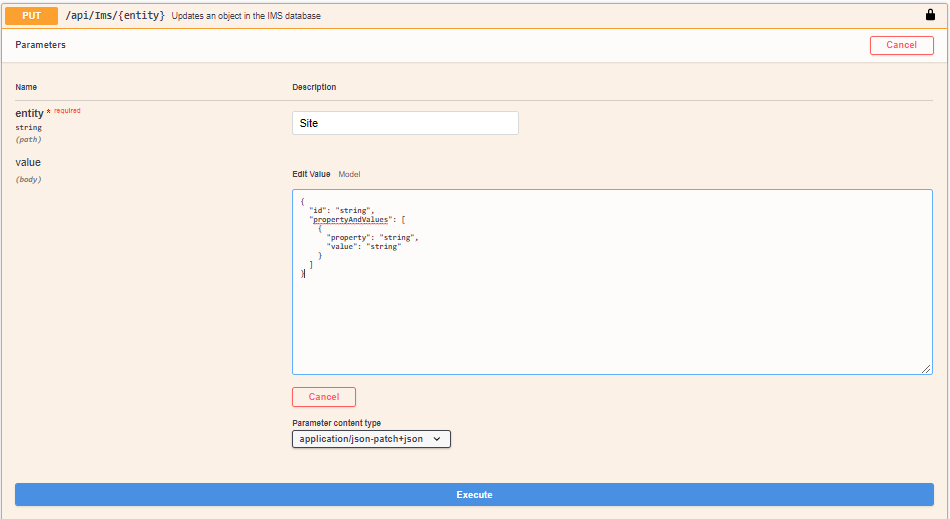
The syntax of the command:
{
"id": "string",
"propertyAndValues": [
{
"property": "string",
"value": "string"
}
]
}
Fill in:
Entity = Site
ID = name:TESTSITEUPDATED
Property = Street
Value = Rigolettostraat
{"id": "name:TESTSITEUPDATED",
"propertyAndValues": [
{ "property": "Street",
"value": "Rigolettostraat"
}
]
}
The call that is generated:
curl -X PUT "http://your url/api/Ims/Site" -H "accept: application/json" -H "Authorization: b7712a28-8398-4367-833d-e591a66082c9"
-H "Content-Type: application/json-patch+json"
-d "{\"id\": \"name:TESTSITEUPDATED\", \"propertyAndValues\": [ { \"property\": \"Street\", \"value\": \"Rigolettostraat\" } ]}"
Note that you don’t need to fill in the Id of the entity as long as you know the Unique name, in this case:
name:TESTSITEUPDATED
The same functionality via the bulk loader looks like this:
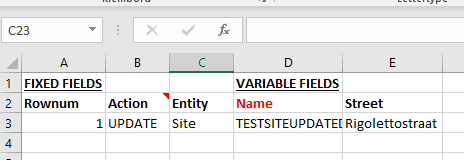
You notice that Entity, Name and Property are also represented.
Please check the helpfile in the bulkloader section for more examples.