Having first opened the Site form from the IMS main menu, the Search area is displayed in the top left corner of the Site form:
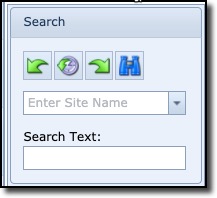
The search pull-down field is used to search for sites matching the entered string in the field
or
when clicking the pull-down icon and using the search fields at the top of each field column to filter/refine your search
The Search Text field is used to search for sites whose information includes what is contained in the Search Text field i.e. typing in LON would return records where any field of information contains LON like London and Barcelona.
Other Site fields which might contain LON could also include City name, Site Name, District, Description, etc., and could form part of the result set.
The 4 buttons offer the following search related functionality: [from left to right]
|
Previous |
Go back to the previously looked at site |
|
History |
Show 20 of your previously looked at sites |
|
Next |
Go forward to the next looked at site [provided you have already used the previous button] |
|
Search |
Left click - search Right click - clear screen |


