Access Speeds
▪ |
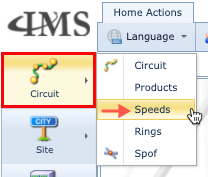
The Speed form is accessed from the IMS Main Menu, by first selecting Circuit, and then Speeds in the dropdown lists |
▪ |
Search for an existing speed from the Search area |
▪ |
Or create a new Speed by selecting the New down arrow in the button bar, followed by New Speed |
Speed Form

The following table gives a brief description of the fields contained in the Speed Form.
Name |
The name of this speed |
SubChannelFrom |
The lowest number this Speed’s sub channel starts from |
SubChannelTo |
The highest number this Speed’s sub channel ends with |
SpeedType |
Short descriptor for this kind of speed i.e., PVC, DynamicVC, IP |
CircuitTypeOption |
Shows the directional aspect of circuits using this speed. Options are BI, UNI, BI or UNI |
ShowSubCircuitMenu |
Right click functionality on a circuit will show sub circuit menu See section below called ShowSubCircuitMenu & ShowCircuitAddNewMenu features
Warning: this option affects overall performance, as the selection of circuits in IMS of this speed, will cause the server to pre-process and retrieve all sub circuits prior to opening the required circuit. Use according to requirements only. |
ShowCircuitAddNewMenu |
Right click functionality on a circuit will allow adding a new circuit on one of the free channels See section below called ShowSubCircuitMenu & ShowCircuitAddNewMenu features |
ChannelView |
Creates predefined channels on: 2MB (32 timeslots), NORMAL (no channelisation – default), VC4 (KML notation), VC4_I (International – allows for T1 access) |
KBits |
Kilobits of payload capacity for this speed. No inherent capacity calculation performed on this field. Potential to write reports that make use of this field. |
LayoutType |
Options for circuits: Multiple, Normal, VCGroup, VLAN. Multiple setting enables a Circuit (service) to: a.Be associated with more than one circuit for High Redundancy b.Be a Point to Multipoint connection – one source many endpoints VCGroup setting is used for Link Aggregation and Hub and Spoke type connections, i.e., Ethernet over Sonet/SDH VLAN setting is deprecated. Normal is the recommended default setting if none of the above are required. |
E2ECheck |
For circuits when their status’ are set to IS, IMS will first endeavour to locate a consistent sequence of relevant links from their A to Z route across the network |
DefaultServiceParts |
Optional field that serves to auto populate a given value, from a dropdown list, every time a new circuit is created |
DefaultProductId |
Optional field that serves to auto populate a given value, from a dropdown list, every time a new circuit is created |
DefaultCustomerId |
Optional field that serves to auto populate a given value, from a dropdown list, every time a new circuit is created |
DefaultVendor |
Optional field that serves to auto populate a given value, from a dropdown list, every time a new circuit is created |
CircuitNameTemplate |
If left blank, the IMS’ standard circuit naming convention is implemented when a circuit is created- The default naming template is: [SITEA.NAME]-[SITEB.NAME]-SPEED.NAME-[ [NUM:3:1:1:10000:0:0:0:0](CUSTOMER.NAME) All circuit names must be unique. |
CableConnectNameTemplate |
Naming convention setup for Cable type connections - Applied using the right mouse option on ports during a Cable Connect activity - typically on DDF/ODF ports. Refer to the section in IMS Basics User Guide called Naming Conventions for more information - Sub sections : Speed and Cable Connect Name Template. |
ExtraInfo |
User defined extra information field for this speed. |
DrawSubCircuit |
Used in conjunction with the Open Circuit Path feature in the CircuitForm Actions button bar. It will also draw the subcircuits contained in the opened carrier circuit. |
UseSubCapacity |
Network Map feature. Enables the display of capacity usage on a carrier circuit – see the screenshots below in section UseSubCapacity feature. |
OloSpeedAllowed |
Allows for association between a circuit and an OLO circuit of different speeds i.e., a circuit of speed 1GBE can be associated with a 500MB OLO circuit. Ordinarily IMS looks for similarity between associated circuit speeds. |
AEndMandatory |
Defines if a circuit using this speed must have a SiteA side component |
ZEndMandatory |
Defines if a circuit using this speed must have a SiteB side component |
MultiPoint |
Will allow for a circuit name to represent more than one circuit made up of various circuits, one for each multi endpoint. |
WizardUsable |
Feature not functional at present |
Optical |
This enables IMS to directly connect two ports together with a cable circuit. Ordinarily IMS first checks for a carrier circuit to be available between the A and Z end ports. |
Test |
If enabled, IMS performs a validation on a new circuit with this speed to ensure that the circuit’s field called Tested is set to YES before saving it. If the field’s value is NO, then an error message warns the user (lower right corner of the Circuit Form) |
IsGeo |
If enabled, new circuits will contain latitude and longitude coordinates, useful for when using the street mapping feature in Network Map. |
ShowVlanId |
If enabled, when a new circuit is created, a VLAN ID must be entered in the VLanId field |
GraphicalX |
Column number definition for channels displayed with the Open Subgraphical feature which can be found in the CircuitForm Actions button bar |
GraphicalY |
Row number definition for channels displayed with the Open Subgraphical feature which can be found in the CircuitForm Actions button bar |

Lower Tabs Panel
The Speed form can contain tabs of information in the lower form panel, relating to the Speed opened in the Speed form.
Sub Layer Tab
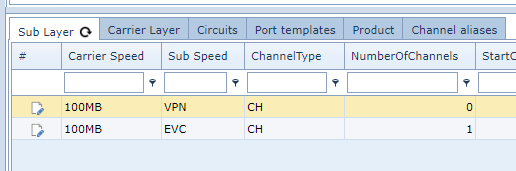
The following information refers to this Speed's sub layer details. There can be more than 1 related Sub Layer Speeds.
Carrier Speed |
Speed of the circuits that can transport a connection of this speed - a.k.a. parent speed |
Sub Speed |
Speed of the circuits that can be transported by this connection |
Channel Type |
Type of channel i.e., PVC made up of VPN channels, OTS with FREQ channels. |
NumberofChannels |
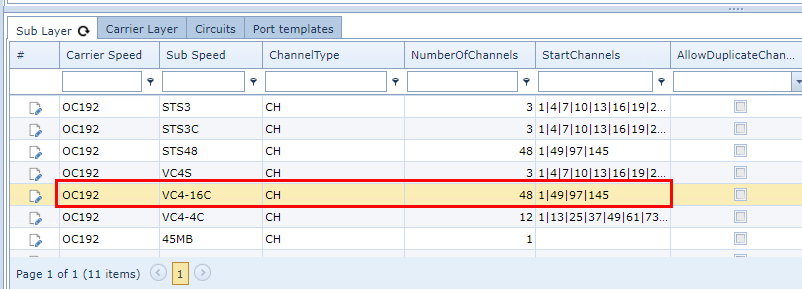
The number of channels a given Sub Layer speed will consume on this particular Speed instance i.e., A Speed of OC192 that has 192 channels may have a related Sub Layer Speed of, say, VC4-16C which would consume 48 channels of this OC192. |
StartChannels |
The first allowable channel number a Sub Speed can be allocated on the Carrier Speeds channelisation group. In the above screenshot, the Sub Speed called VC4-16C can only be allocated on free channels starting with 1, 49, 97, or 145 of the Carrier Speed OC192. |
AllowDuplicateChannels |
Allow for duplicate channels |
AllowChannelZero |
Channel 0 (zero) may be used. This relates to legacy technologies like TDM. |
AllowLessChannels |
Allow for less channels (capacity) to be used |
MaxCarriers |
Limit the number of carriers |
AllowScatteredChannels |
Allow channels to be consumed in a non sequential manner |
AllowProtection |
Allow for protection channels |
Carrier Layer Tab
The following information refers to this Speed's carrier layer details. There can be more than 1 related
Carrier Speed.
Carrier Speed |
Speed of the circuits that can transport a connection of this speed - a.k.a. parent speed |
Sub Speed |
speed of the circuits that can be transported (carried) by connections with this Speed connection |
Channel Type |
type of channel |
NumberofChannels |
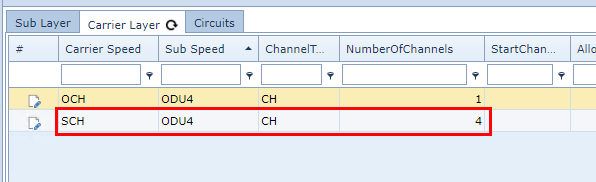
The number of channels a given speed will consume on its Carrier Speed i.e., A Speed of ODU4 will consume 4 channels on its carrier Speed called SCH. The SCH Speed itself is comprised of 20 channels - refer to the above screenshot (Carrier Layer). |
StartChannels |
The first allowable channel number a Sub Speed can be allocated on the Carrier Speeds channelisation group. In the above screenshot (Sub Layer), the Sub Speed called VC4-16C can only be allocated on free channels starting with 1, 49, 97, or 145 of the Carrier Speed OC192. |
AllowDuplicateChannels |
Allow for duplicate channels |
AllowChannelZero |
Channel 0 (zero) may be used. This relates to legacy technologies like TDM. |
AllowLessChannels |
Allow for less channels (capacity) to be used |
MaxCarriers |
Limit the number of carriers |
AllowScatteredChannels |
Allow channels to be consumed in a non sequential manner |
AllowProtection |
Allow for protection channels |
Circuits Tab
This tab provides a list of all circuits in IMS that are of this Speed.
For detailed columnar information please see the section called Circuits.
Port Template Tab
This tab provides a list of all Port Templates in IMS that are of this Speed.
In the screenshot below, some of the templates have multiple associated Speeds which are separated by the
pipe ( | ) symbol
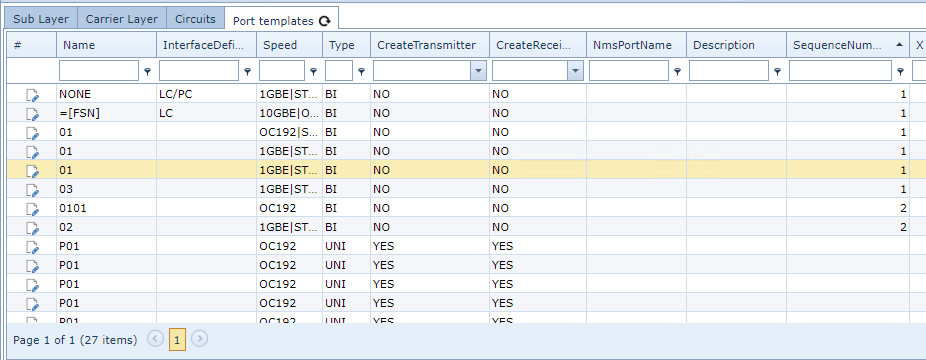
Name |
The name of the port (can be a formula) |
InterfaceDefinition |
Interface type i.e., SC/PC, BNC, RJ45 |
Speed |
Speed or capacity of the port |
Type |
whether the port is BI(directional) or UNI(directional) |
CreateTransmitter |
For Unidirectional cases: whether this port is a Transmitting port - option is Yes or No |
CreateReceiver |
For Unidirectional cases: whether this port is a Transmitting port - option is Yes or No |
NmsPortName |
How the port is called in the NMS |
Description |
Free text field containing user defined extra information |
SequenceNumber |
The port's sequence number in the port template |
X |
X-position of the port on a card (or equipment) |
Y |
Y-position of the port on a card (or equipment) |
Width |
Width of the port when drawn on the equipment |
Height |
Height of the port when drawn on the equipment |
DrawType |
Shape of the port - options are Undefined, Circle, or Rectangle |
OLO Circuits
This tab provides a list of all OLO Circuits in IMS that are of this Speed.
Name |
Name of the OLO circuit |
OLOCircuitType Name |
Type of OLO circuit i.e., Interconnect, Leased Line. |
AccessMethod |
Access method i.e., DSL, Telephony |
InventoryStatusId |
IMS status of the connection |
Circuit |
Related circuit name |
ExtraInfo |
Free text field for additional information |
UserName |
IMS sser that created the OLO circuit |
CreateDate |
Date the OLO ciruit was created in IMS |
Customer |
Customer name if OLO is related to a specific customer |
Distance |
Total length of the OLO circuit |
OLO Products
This tab provides a list of all OLO Products in IMS that are of this Speed.
Name |
Name of the OLO product |
Speed |
Speed of the OLO product |
DeliverSla |
Service level agreement for delivery |
RepairSla |
Service level agreement for repairs |
SpeedAB |
Speed for the A to B direction - applicable for Unidirectional OLOs |
SpeedBA |
Speed for the B to A direction - applicable for Unidirectional OLOs |
Coefficient |
Coefficient of the OLO product |