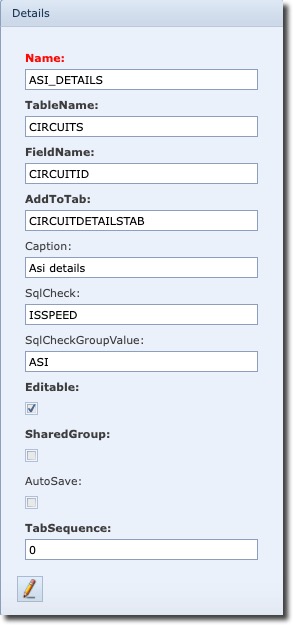
The following is a description of of an SqlCheck example called ISSPEED and its actual SqlCheckQuery which can be found by clicking on the All sql checks option in the ExtraFieldGroupForm Actions button bar
SqlCheckQuery:
Example
Name: ISSPEED
SELECT 1 FROM CIRCUITS where '|' || '#REPLACEVAL#' || '|' like '%|' || SPEED || '|%' AND #REPLACE#
SELECT 1 |
1 refers to a boolean value which means this query will take effect if the result of the query is positive or 1. If the result was negative, the boolean equivalent would be 0 and therefore this query would not take effect. |
CIRCUITS |
This is related to the TableName field as shown in the Details section in the above screenshot. The SQL select query will be run on the CIRCUITS table in IMS |
'|' || '#REPLACEVAL#' || '|' |
The ‘Pipe’ symbols let the SQL query know that there could be more than one value to consider i.e., more than one speed – different speeds will have a pipe symbol between them. |
|| '#REPLACEVAL#' || |
The two || symbols are like containers for IMS commands like REPLACEVAL which lets the query take the values contained in the SqlCheckGroupValue field, in this example 10GBE to perform the comparison |
like '%|' || SPEED || '|%' |
The % symbol is the SQL wild card symbol and the two | pipe symbols are letting the SQL query consider more than one value of speeds if necessary |
#REPLACE# |
This REPLACE IMS command will take the ObjectId of the open IMS screen/form – a circuit form screen in this case, and therefore its CircuitID |
SqlCheckValueList: deprecated