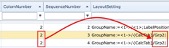
The Extra fields tab contains all the parameters and attributes required for each extra field of information as
well as its position information in their layout panel.

The table below provides a brief description of each column field.
SqlCheck |
A drop down list of existing Sql/IMS scripts that can be applied at individual field level, but typically a new SqlCheck instance would be created for each new ExtraFieldGroup field instance by using the Add new sql check button in the button bar.
When you do not wish to implement an SQL/IMS statement here, but rather just use the SqlCheckValue field contents, then assign the value of ISTRUE in this SqlCheck field, which will validate for a true condition of the SqlCheckValue field contents. |
SqlCheckValue |
IMS script symbols which can be used in conjunction with other fields (extra fields) to create condition statements |
ValueType |
The field’s ‘type’. There are 9 to choose from a dropdown list: Checkbox, Date, Date Time, Fieldname, Formula, Memo, Numeric, Query, Text. If QUERY is used then it operates in conjunction with a Sql/IMS script statement, which is designed to pouplate this field with the query statement’s return value |
LabelText |
The field’s name as it will appear in the layout panel |
Mandatory |
Checkbox to indicate if the field is to be a mandatory one. |
ColomNumber |
The column position (vertical placement) this field will appear in, in the layout panel |
SequenceNumber |
The position of this field in a grouped set of fields i.e., a tab, or boxed group |
LayoutSetting |
Determines how the extra field will be placed in the layout panel – see below for more details.
Should the Layout Setting feature be used, then the value in the ColomNumber field will now only apply within the context of the field group being referenced and not the layout panel.
|
ComboList |
List of user defined values separated by the pipe symbol. It can also display a dropdown list derived from a SQL query like: Select Location from Locations – this will produce a dropdown list of all sites. Select Nodename From Nodename Where Nodelocation ='[#Site#]' Order By Nodename – this will produce a list of all nodes contained within the site as entered in the extra field Site field |
DefaultValue |
User defined value that will always appear in the entry field |
Validation |
Validation for data entered at run time … i.e., date entered must be in the future – or alternatively past |
Formula |
For fields that are derived or require a user defined formula like adding to other fields together. |
ValueFromSql |
A field that derives its value from an SQL query i.e., the circuit name opened in the current form. |
TooltipText |
A hover over tool tip of information for the given extra field |