The WF Graphical tab (WF – work flow), provides a quick visual way to understand how the tasks flow in a given Order Type.
The following screenshot is an example of a task flow diagram where one of its component tasks performs a decission making activity.

Task A represents the automated task that determines which subsequent task (B or C) is processed.
Based on a data field value called [DESIGN OK? (ENG)] from a previous task called [REVIEW DESIGN (ENG)], the expected value is YES or NO.
From the variable called AutoWorkflowRelatedObjectsTask in the task called ‘DESIGN OK?’ (A), the decission process is now observed as follows:
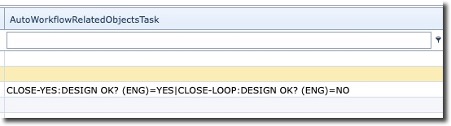
IMS will process this value according to the decision statement mentioned above. One of two options
is possible:
If the value of the field = YES
Then the first portion of the decision statement will be followed, else the second portion
(Loop) will be followed.
In summary, the following screenshot attempts to show the sequences and flow IMS takes based
on data presented in the tasks:

Order Task Flow Line Colours
Black |
NORMAL – originates from an Order Task with a simple sequential flow |
Gold |
LOOP – originates from an Order Task where the validation process results in the CLOSE-LOOP option |
Green |
YES – originates from an Order Task where the validation process results in the CLOSE-YES option |
Red |
NO – originates from an Order Task where the validation process results in the CLOSE-NO option |