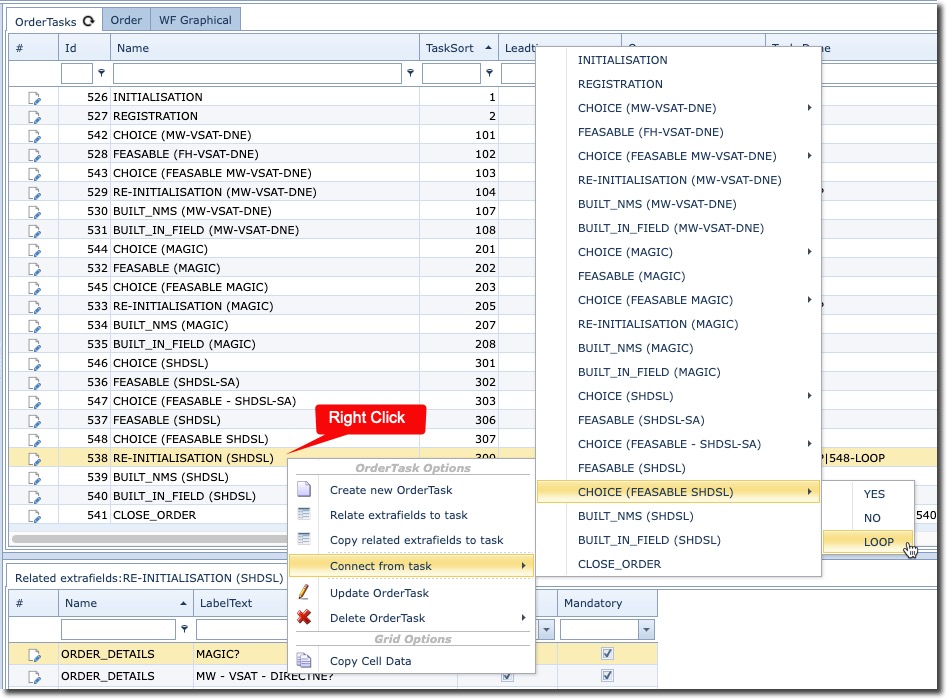
Although the process is the same, this can be achieved either by right clicking on an Order Task line in the OrderTasks tab, or right clicking on an Order Task rectangle in the WF Graphical tab. The following screenshots show how.
OrderTasks Tab:
WF Graphical Tab:

▪ |
Right click on an Order Task item |
▪ |
From the dropdown list of all relevant Order Tasks for this Order Type, select the appropriate Order Task that precedes this one |
▪ |
If the preceding Order Task contains a decision mechanism, then click and expand it |
▪ |
Click on the relevant dropdown list option: YES, NO, LOOP |
▪ |
To amend or remove a dependent Order Task, double click on the relevant Order Task line from the OrderTasks tab, and simply remove the Id number in the TasksDone column field. See screenshot below |
