The next step is to determine how these tasks relate to each other from a sequence or flow perspective, including any previous task dependencies.
The following set of instructions makes reference using an existing example of a completed OrderTask . References will be made from the OrderTask and WF Graphical tabs.

In the following instructions individual Order Tasks with Id of 538, 547, and 548 will be singled out in order to better explain the flow build process.
Observing Order Task Id number 538 - RE-INITIALIZATION (SHDSL) from the above screenshot, notice the TaskDone column field in which 544-LOOP and 548-LOOP is mentioned. The separator character used between the two Order Tasks is the Pipe symbol.
The TasksDone column field is where the previous Order Task dependencies are set.
The TaskDone field for Id 538 lets IMS know that the only way to trigger task Id 538 is from tasks Id 544 or 548 – when they are effectively closed.
Furthermore, both of these two other Order Tasks (547 & 548) have the LOOP condition, this should warn us that they both contain a decision process – more than likely CLOSE-LOOP and CLOSE-YES options.
This can be verified by scrolling the list of Order Tasks to the right until the AutoWorkflow… columns appear. See the screenshot below.

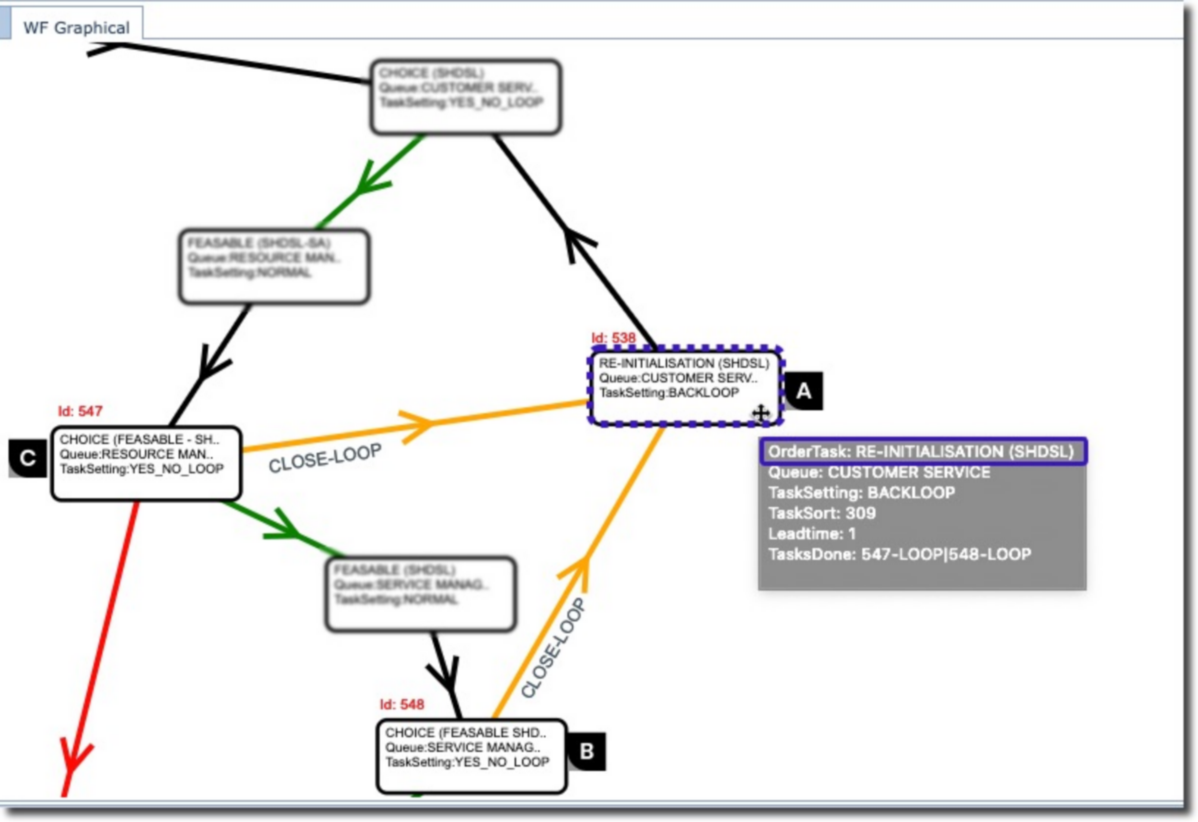
Another way to view these task dependencies and condition flows is by inspecting the WF Graphics tab. See the screenshot below.
Some points to notice:
Referencing the above screenshot, and as stated earlier, Order Task 538 - RE-INITIALIZATION (SHDSL), represented by rectangle A, will only be triggered by Order Tasks B & C - . Notice also that the feed lines into A are yellow in colour. Yellow represents a LOOP condition line.
Order Tasks B & C Task Setting is YES_NO_LOOP – indicating it contains a decision process mechanism.
Order Task A Task Setting is BACKLOOP – indicating that it feeds back into a previous Order Task.
An Order Task can be inspected by the mouse hover action over any of the rectangles in the WF Graphical tab, as seen in Order Task A above