One card (definition) can have multiple card codes (part numbers).
Those card definitions can be managed in the card code form.
Open Card Code Definition form
The form can be opened via the Node menu on the left of the screen, option “CardCode Definition”.

Existing card codes can be found via the search field on the top left of the screen.

The following fields are visible in the screen:
CardDefinition |
Name of the card (definition) |
Vendor |
Name of vendor (e.g. CISCO) |
Name |
Name of card code (part number of card) |
Height |
Height of card code |
Width |
Width of card code |
CardCodePicture |
Picture name (for getting a real card picture in node form) |
EndOfSale |
Date end of sale of this card code |
EndOfLife |
Date end of life of this card code |
EndOfMaintContract |
Date end of maintenance contract of this card code |
PartOfMaintContract |
Maintenance Contract name related to this card code |
PowerConsume |
Power consume of this card code |
HeatProduction |
Heat production of this card code |
Create new Card Code Definition
To create a new card code, press button “Create new card code definition”.
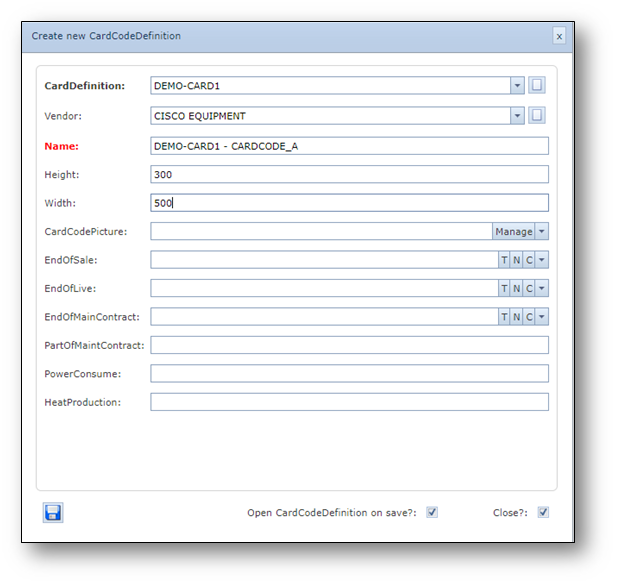
A pop-up window appears, see screenshot below.
Fill in the details of the new card code and press save.
Example screenshot of the creation of a card code definition:
View Card - Card Code relations
To view all card codes that are linked to the card definition, click on the “Related Cardcodes” tab.
