Ports can be created on the main card (definition) or on the card code.

To add ports to a cardcode press button PortTemplate and chose option “Add port template”
A pop-up window appears.
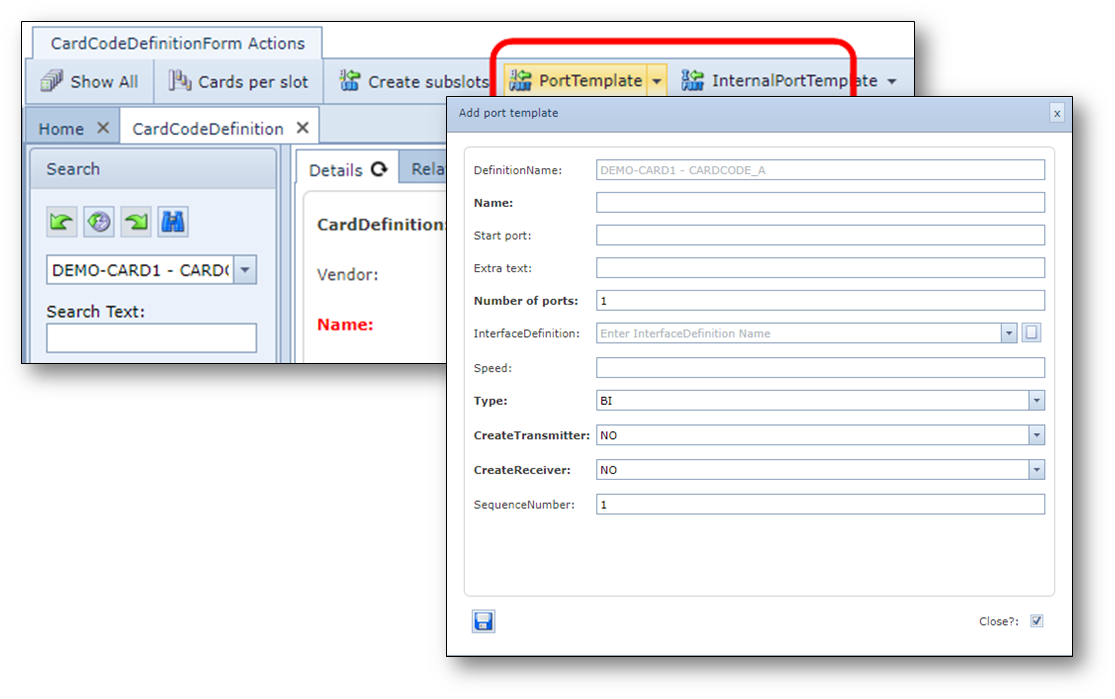
DefinitionName |
Already filled in and greyed out |
Name |
Name of the port. Examples: P / |
Start port |
First port number to create, for example: 01 0 0003 |
Number of ports |
How many ports need to be created |
InterfaceDefinition |
Interface type (e.g. SC/PC, BNC, RJ45, etc) |
Speed |
Port speed (type of connection that can be configured on it). In case of multiple speeds, use piper symbol as separator, for example: 1GBE|100MB|100MB |
Type |
BI or UNI (directional port) |
CreateTransmitter |
Create TX port YES or NO |
CreateReceiver |
Create RX port YES or NO |
Sequence number |
Sequence number of the first port (default 1) |