This chapter describes the Customer object in VC4’s IMS.
The Customer object represents an entity that owns, leases, pays for, or is in charge of network assets recorded within the IMS system. This ‘entity’ could be a direct commercial customer, a single person, a group of people, a mobile network operator, an Other Licensed Operator, or even a technology platform like MPLS or DWDM.
In the case of a technology platform, say DWDM, this could be an internal department within the enterprise that is in charge and responsible for that part of the network. So how you use the Customer object will be based on your business logic and practices.
The Customer form allows you to create, modify, or delete customer instance details.
The Customer Contacts object is seen as a related entity to the Customer object. An example of the Customer Contacts could be an individual, a group of people, or even a department like ‘Tech Support’ or ‘Field Engineers – RAN’. Customer Contacts can be associated with one another as well as Customer Contact Group, and Site objects.
This chapter will explain how to find and register Customer and Customer Contact details.
Opening the Customer form
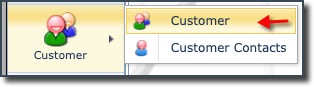
It is accessed from the main menu bar, which when selected, reveals 2 more items in the dropdown list [Customer, Customer Contacts].
▪Click on the Customer object icon
▪This opens the Customer Action tab and the Customer form