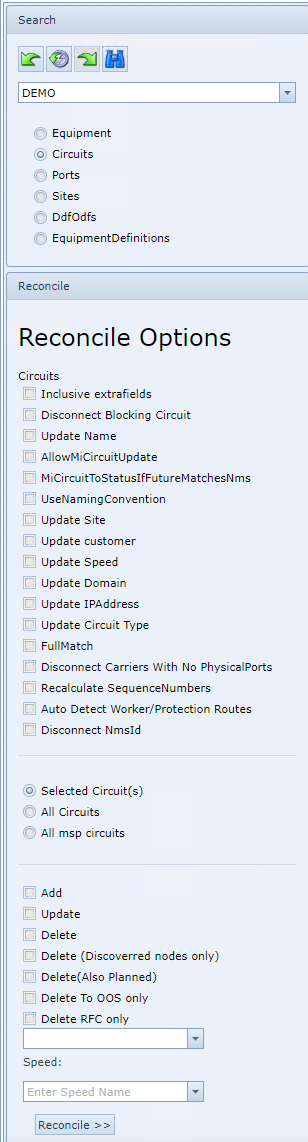
The following is a description of the Reconcile Options available for the Circuit objects:
|
Reconcile Options – reconcile to the IMS database the following: |
|
|
Inclusive extra fields |
Reconcile the circuit including the related extra fields - used with the Add and Update options |
Disconnect blocking circuits
|
This option will check if there are circuits in IMS that prevent another circuit to reconcile to the correct route as per the network. With this option, when blocking circuits are found, those will be disconnected from the route in IMS. |
|
Update name
|
This option will update the IMS circuit name with the name of the circuit found in the network - used with the Update option |
|
Update site
|
This option will update the site information of the IMS circuit with the sites info found in the network data. - used with the Update option |
|
Update customer
|
This option will update the customer information related to the circuit in IMS with the customer using network data. - used with the Update option |
|
Update speed
|
This option will update the speed/bandwidth setting of the IMS circuit with the speed found in the network. - used with the Update option |
|
Update domain
|
This option will update the domain information of the IMS circuit with the domain found in the network. - used with the Update option |
|
Update IP-address
|
This option will update the IP-address information of the IMS circuit with the IP address found in the network data. - used with the Update option |
|
Update circuit type
|
This option will update the circuit type information of the IMS circuit with the circuit type found in the network. - used with the Update option |
|
Full match |
This option will only reconcile circuits that have a full match with the circuit, carriers, and ports in IMS. If there is one or more difference between the circuit and related carriers or ports from the network and IMS, the IMS circuit will not be updated. - used with the Update option |
|
Disconnect carriers with no physical ports |
This option will disconnect all the circuit carriers that have no relation to any IMS physical port. |
|
Auto detect worker protection routes |
This option will automatically detect worker and protection paths in IMS with the details from the network data. |
|
Disconnect NmsId |
Used when object is no longer in the network or NmsId is associating the wrong object. This action therefore breaks any existing link between an object in IMS and NMS |
|
Selected Circuit(s) |
Reconcile only the selected circuit in the grid |
|
All Circuits |
Reconcile all the circuits |
|
All msp circuits |
Reconcile only all the MSP [Multiplex Section Protection] connections - this can also reconcile other protection types, not just MSP. |
|
Add |
Selected circuit This will add the circuit into the IMS database that does not exist in IMS yet. All circuits This will search for all the reconcile circuits that has no relation to IMS yet. It will try to add those circuits into the IMS database using the network data. |
|
Update |
Selected circuit This will update the circuit selected with network data. All circuits This will update IMS circuits that have discrepancies with the network. |
|
Delete |
This will delete all the circuits in IMS of the selected network platform that do not exist in the network anymore. |
|
Delete (Discovered nodes only)
|
This option is to ensure that only circuits from nodes that were discovered in the network are deleted. These circuits are then to be recreated with the fresh data. |
|
Delete (Also Planned) |
This will override IMS' default deletion principle of In Service (IS) status circuits objects only, and include Planned (PL) as well as IS |
|
Delete To OOS only |
Instead of Deleting circuit objects from IMS, this action rather sets the agreed upon object to a status of Out Of Service (OOS) instead. |
|
Delete RFC only |
Delete from IMS any circuit objects with status RFC [Request For Cease] that are no longer in the network |
|
Dropdown field (Status) |
This will reconcile the selected circuits to the status that is selected. If no status is selected, the default status will be PL (planned). |
|
Speed dropdown field |
When a speed is selected, it will only reconcile the circuits with the selected speed. For example if you select 1GBE it will only reconcile the circuits with the speed 1GBE |
|
Update Relations
The Update Relations option is available when there is an existing association between a circuit in IMS and NMS. It updates the IMS circuit details with any new (delta) NMS information that has taken place.
3 IMS reconcile circuit tables are updated; Route, Port, and Internal Port. Although it is listed to be run separately, these tables are updated anyway when the Reconcile (Circuit) option is run.

The Reconcile Circuit routine will uses the update method for Circuitrelations when there is a change in: Timeslot, Direction, Carrier Direction, or Worker/Protection information on the Carrier record. |