From the Main Menu bar Click on the Customer object icon
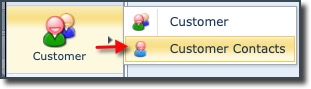
▪Click on the Customer Contacts item from the dropdown list provided
▪This opens up the ContactsForm Actions tab
▪Click on the Create new option in the ContactForm Actions button bar
▪This opens up the Create new Contact popup window

▪Fill in the mandatory fields (click field IsGroup if this contact is a group type contact)
▪Fill in other fields as required
▪Click on the Save icon in the lower left of the popup window
If you have selected the Is Group option, the following popup window is displayed:

The following table briefly describes the various fields encountered in the Create New Contact popup form:
Is Group |
Mandatory field if Contact is to be a of a group type (see previous screenshot) |
Name |
First name of this contact |
InFix |
Special character to act as a separator |
LastName |
Surname of this contact |
Gender |
Male / Female |
Phone |
Contact number i.e., work |
Mobile |
Contact number |
Fax |
Facsimile number |
Webpage |
Webpage related to this contact |
Email for this contact |
|
PlannedWorkMail |
Planned Work (PW) notifications email |
TroubleticketMail |
Trouble Ticket (TT) notifications email |
JobTitle |
This contact’s role or work title |
Priority |
This contact’s priority |
PlannedWorkMailType |
Text or Calendar Invite |
Language |
Choice of 4: English, French, German, Netherlands |
ExtraInfo |
Any additional information related to this contact |