From the SiteTemplateForm Actions button bar:
▪ |
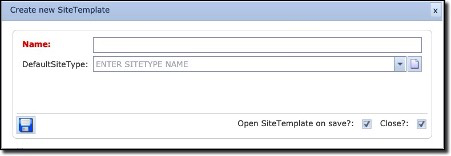
Select the Create new icon – this opens the Create new SiteTemplate popup window |
▪ |
Type in the Name field your required Site Template name |
▪ |
Select from the DefaultSiteType dropdown field an existing Site Type that this new template will represent ... or ... create a new Site Type by clicking on the New icon at the end of the DefaultSiteType field – which open up a new popup window. |
▪ |
Click on the Save icon in the lower left of the popup window to save and close your work |
|
The DefaultSiteType used above will also be applied to any new Sites being created that use this Site Template. When a new Site instance is created invoking this Site Template, it will inherit the Site Template’s site type i.e., CORE, Customer, etc. The new Site instance will also receive a name according to the standard naming convention. |

This new Site Template has no related Node or DDF/ODF templates.
Now a node template and/or a DDF/ODF template must be related to this Site template.