This chapter describes the Site, Node, and DDF/ODF template feature in VC4’s IMS.
Templates can speed up the process of creating and deploying network objects. The obvious benefits here are that the end users make better use of their time, as well as reducing errors in the objects being deployed.
On such repetitive tasks, like creating cards into slots, it would be very easy to insert the wrong types or versions of cards if this process were performed manually for each node being deployed.
Site Template |
A site template creates multiple objects (nodes, DDFs/ODFs/PPs/Splice boxes) in a new or existing site.
A site template needs at least 1 node or DDF/ODF template, but can have multiple templates related to it i.e., a site with n number of object templates) |
Node template |
A node template creates a node (or multiple nodes) of a specific node configuration, optionally including shelves and cards (and sub-cards). |
DDF/ODF template |
A DDF/ODF template creates a DDF/ODF/PP/Splice box, or multiples, of a specific DDF/ODF/PP/Splice box configuration. |
Templates are particularly useful when deploying one or many sites like cell towers, Edge sites, and even whole floors of equipment

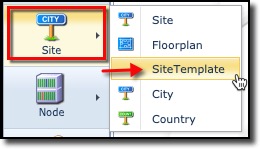
The Site template functionality is accessed from the IMS main menu bar.
▪ |
Click on the Site option |
▪ |
From the dropdown list click on SiteTemplate |
▪ |
This opens the SiteTemplateFormView |