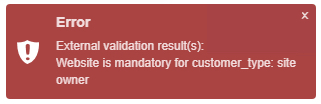
website is mandatory only for customer_type: SITE OWNER
In this exercise, an SQL statement will be added to the external validation instance that will ensure when the
Customer Type field selected is SITE OWNER, then the Website field will not remain empty when a new Customer object is added to IMS.
Start by opening a new Create new ExternalValidation popup window - instructions on this are in the
previous section.
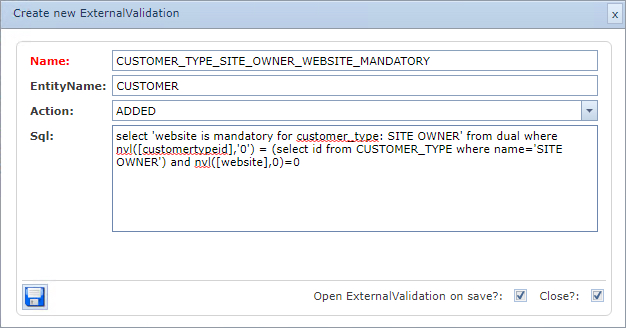
Fill in the following data into the popup form as below.
Name |
CUSTOMER_TYPE_SITE_OWNER_WEBSITE_MANDATORY |
EntityName |
CUSTOMER |
Action |
ADDED |
Sql |
select 'website is mandatory for customer type: SITE OWNER' from dual where nvl([customertypeid],'0') = (select id from CUSTOMER_TYPE where name='SITE OWNER') and nvl([website],0)=0 |
▪Click on the Save icon in the lower left corner.
The next step is to test the validation by creating a new Customer object and omit completing the
Website field when the CustomerType field is SITE OWNER
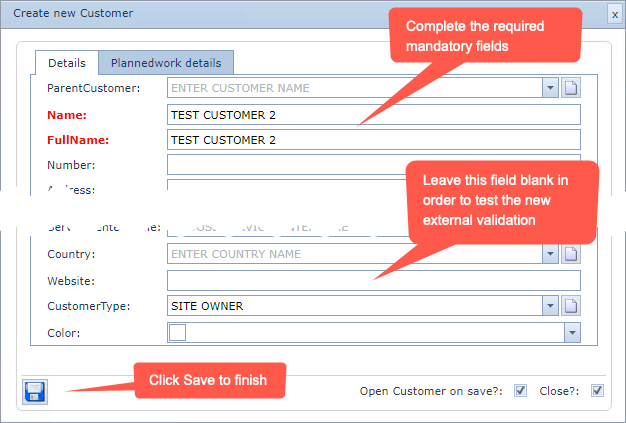
The result should show the validation message at the lower right corner of the screen