Content:
➢Open External Validations
Introduction
Extra validations can be carried out on IMS entities before they are added, updated, or deleted. This is particularly useful when the existing standard IMS validations are not enough to meet individual use cases.
We refer to these extra validations as External Validations.
Open External Validations
From the IMS Main Menu:
▪Click on the System option, this opens a dropdown list of further options
▪Click on the External validations option

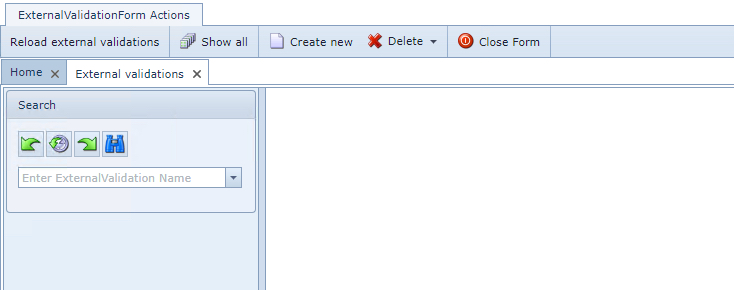
This opens up a blank External Validations form.
Create a New External Validation
From the ExternalValidationForm Actions button bar:

▪ |
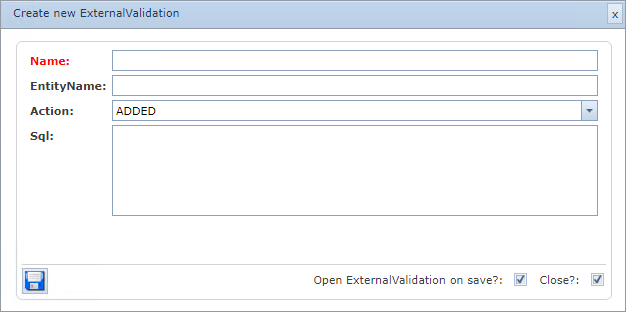
Click on the Create new option, this opens a Create new ExternalValidation popup window |
▪ |
Enter the Name field with a unique name for this new External Validation instance |
▪ |
Enter the EntityName field with the value of the IMS object/entity |
▪ |
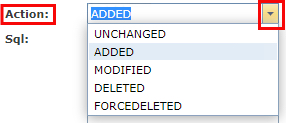
From the Action dropdown field, select the appropriate option - the SQL validation will be processed when one of these actions is applied to the associated IMS object |
|
|
|
oUnchanged |
|
oAdded |
|
oModified |
|
oDeleted |
|
oForcedeleted |
▪ |
Enter the SQL field with the required validation command |
▪ |
Click on the Save icon - lower left corner - when finished |