Mobile phone numbers
It is worth pointing out how different countries set up mobile phone numbering plans.
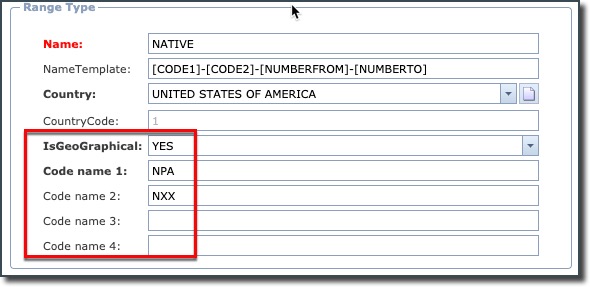
In the USA & Canada, these numbers would be considered geographical since they are prefixed like fixed line numbers with NPA/NXX. In TNM, we make use of the IsGeoGraphical field option of YES.
For other parts of the world, we can select the NO option which gives us one field (Number Code 1) in which we can place the mobile phone number prefix i.e., Netherlands with 6, UK with 7.
Yet in the case of Singapore, where the prefix can be either 8 or 9 (includes pagers until May 2012), the NO option for IsGeographical can still be used, it will be a case of creating two TNRTs, one for the legacy prefixes and another one for the 8 prefixes.
Non geographical numbers
In each country there is a list of non geographical type numbers, the following is an example list:
oFreephone
oPublic sector
oPremium business rate
The IsGeoGraphical option of NO can be used with these types of numbers, unless you need to make use of more than one prefix (code field).
Setting Up a TNRT
Telephone Number Range Type (TNRT) is an essential function that when applied to a range of numbers will determine the way in which those telephone numbers will be used. The IsGeoGraphical and Country components establish the way in which the numbers are configured.
The Country Code is an essential makeup of a telephone number and will be derived from the Country field you chose i.e., UK numbers will inherit the 44-country code, Dubai will be 971, The Netherlands 31, and so on.
The IsGeoGraphical field provides us with up to 4 Code name fields which can be combined in the Name Template field to produce a set format naming convention. This is of value for US & Canadian telephone numbers as we will see shortly.
Having clicked on the Create new TNRT icon from the previous chapters
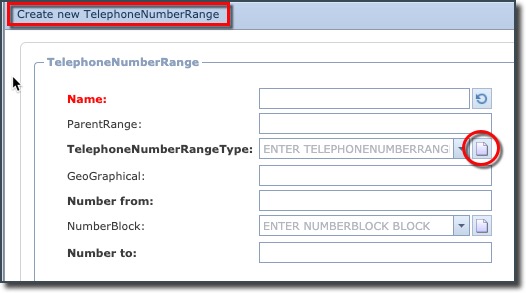
A pop-up window appears titled Create new TelephoneNumberRangeType
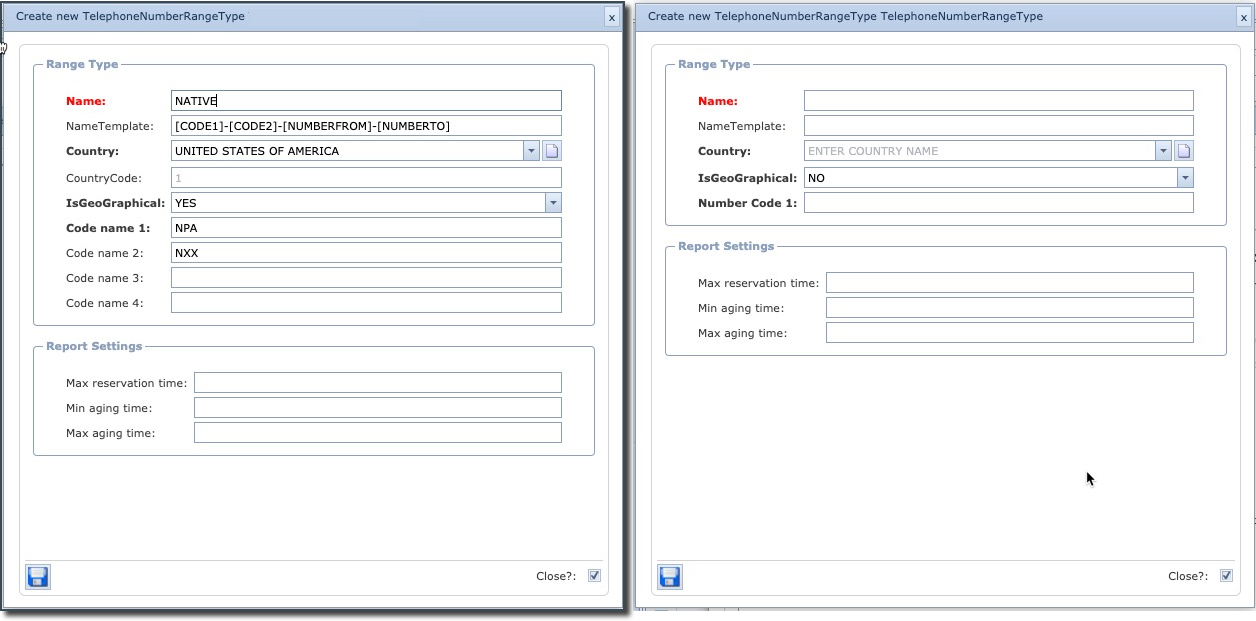
The below screenshots show the differences between the IsGeoGraphical field options (NO/YES)
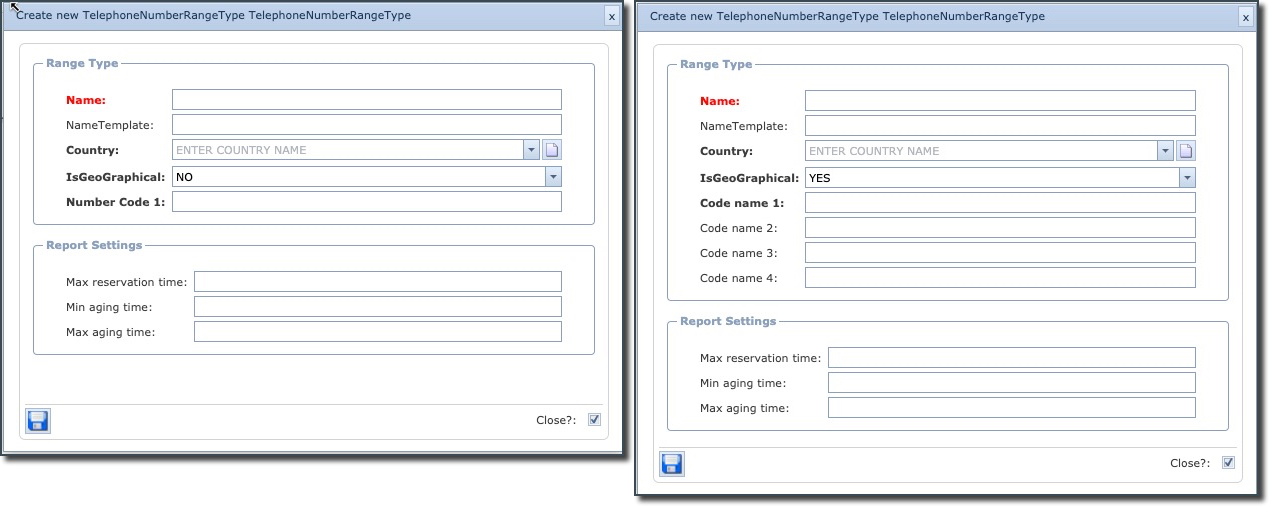
This chapter gives an example of setting up a North American TNRT with particular reference to Code Number/Names, when selecting the Yes option to the property called IsGeographical, up to 4 Code Number/Names are given, which adequately serves the NPA and NXX requirements.
For non-North American TNRT setup simply select the No option for the IsGeographical property, which will result in just one Code Number/Name which can then represent the fixed line area code or mobile phone prefix i.e. 06 or 07949 etc. |
Fill in the required fields of information contained in the Range Type and Report Settings groups, in particular any mandatory ones, as follows:
Range Type group of fields
Name |
- Typically, in the USA and Canada, numbers are designated into two groups: Native and Non Native numbers. Native numbers correspond to your own company whilst Non Native numbers are those that have been ported from other phone companies over time - Other options could be: MOBILE, FREE SERVICE, VOIP, etc. depending on the type of range your telephone numbers will represent – in one of our examples we will create FIXED LINE |
Name Template |
The NameTemplate field enables you to automate TNR names by combining field names with separators – any valid field names can be used for example: [MARKET.NAME]-[COUNTRYCODE]-[NUMBERFROM]-[NUMBERTO]-[CUSTOMER.NAME] |
In this chapter the following Name Templates are shown:
oFor the USA & Canada example (NATIVE): [CODE1]-[CODE2]-[NUMBERFROM]-[NUMBERTO]
oFor the Standard example (FIXED LINE): [CODE1]-[NUMBERFROM]-[NUMBERTO]
The content of CODE1/CODE2 is derived from the 4 Code name fields given when IsGeoGraphical is set to YES. If IsGeographical is set to NO, then you are only offered a CODE1 field.
The NUMBERFROM and NUMBERTO values in the Name Template will be derived from those fields which are in the Telephone Number Range (TNR) form.
Country |
- Select an entry from the drop-down list provided or create a new country name as required |
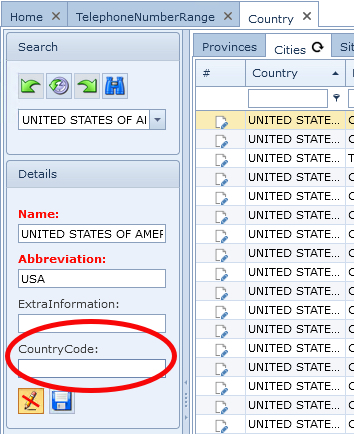
If the Country option required does not appear in the drop down list it could mean the CountryCode field is missing from that Country's instance. This can be verified by opening the Country form and adding its code in IMS, as shown in the following screen shot |
IsGeoGraphical |
2 options as described below |
➢NO: produces only 1 Number Code field - suitable for non-North American cases
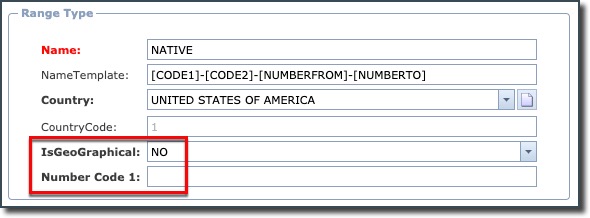
➢Yes: produces up to 4 Code names - suitable for North American cases
Report Settings group
Max reservation time |
<number of days> |
Min aging time |
<number of days> |
Max aging time |
<number of days> |
Save |
Click on the Save icon in the bottom left corner of the window |
The following screen shots are the TNRT examples which are used in this document.
After saving your work, this will close the TelephoneNumberRangeType window.
Now return to the work you were completing in the TelephoneNumberRange section of:
Tel. Number Ranges: USA & Canada or
Tel. Number Ranges: Standard